
North Myrtle Beach, SC · Horry County
Commercial Building Envelope Sealing Certificate
This certificate documents building-envelope sealing work and is completed by the contractor or third-party inspector for a commercial building permit.
- licensed online notary
- ~15 min average
- Notarized PDF emailed
What you’ll need
- Government-issued photo ID
- Webcam-enabled device (laptop or phone)
- This form, ready to upload as a PDF
What this form is
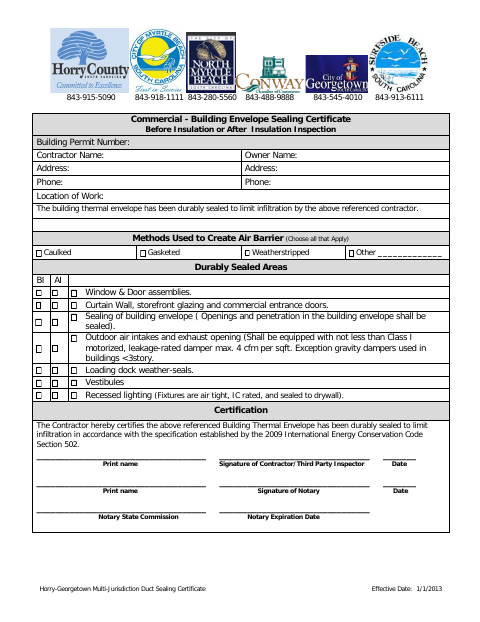
The certificate records the building permit number, contractor and owner details, methods used to create an air barrier, and areas sealed before or after insulation inspection. The contractor or third-party inspector certifies that the building thermal envelope was durably sealed to limit infiltration. Use it when the permit process requires this certificate for commercial building envelope work.
Who needs it
A contractor or third-party inspector completing commercial building envelope sealing work may need to submit this certificate for the associated building permit.
Why it needs a notary
The form provides a notary signature block, but no jurat or acknowledgment wording; the contractor or third-party inspector signs the certification before the notary.
How to get this notarized
- 1
Download The Certificate
Get the Commercial Building Envelope Sealing Certificate from the City of North Myrtle Beach.
- 2
Fill In Project Details
Enter the building permit, contractor, owner, address, and work-location information, then mark the applicable sealing methods and areas.
- 3
Book An Online Notary
Arrange a session with a commissioned online notary and check that the form and signer details are ready.
- 4
Sign On Video
The contractor or third-party inspector signs the certification during the online notary session.
- 5
Submit To The City
Send the completed certificate to the City of North Myrtle Beach as directed for the building permit.
Preview the form
The blank PDF straight from North Myrtle Beach. Look it over, then upload your filled copy to start the notary session.

You’ll need ID and a webcam.
A licensed online notary will join you on video, verify your government-issued ID, witness your signature, and apply their seal. You’ll receive the notarized PDF by email when the session ends.
Frequently asked questions
- How do I complete this certificate?
- Enter the permit and project details, select the sealing methods and areas, and have the contractor or third-party inspector complete the certification and notary section.
- Do I need to sign before a notary?
- The form includes a notary signature block. The contractor or third-party inspector signs the certification before the notary; confirm with the city or town if unsure.
- Can a commissioned online notary notarize this form?
- South Carolina has not authorized remote online notarization by its own notaries. A commissioned online notary may perform a notarial act under the law of the jurisdiction where it is made; South Carolina recognizes qualifying out-of-state notarial acts.
- What information does the certificate request?
- It asks for permit, contractor, owner, address, and work-location details, plus the air-barrier methods and sealed areas. The contractor or third-party inspector certifies the work.