
Deadwood, SD · Lawrence County
Affidavit for Transfer of Alcoholic Beverage License
This one-page affidavit records an owner’s sworn statement about a transfer or sale of an alcoholic beverage license and is filed by the owner involved in the transfer.
- licensed online notary
- ~15 min average
- Notarized PDF emailed
What you’ll need
- Government-issued photo ID
- Webcam-enabled device (laptop or phone)
- This form, ready to upload as a PDF
What this form is
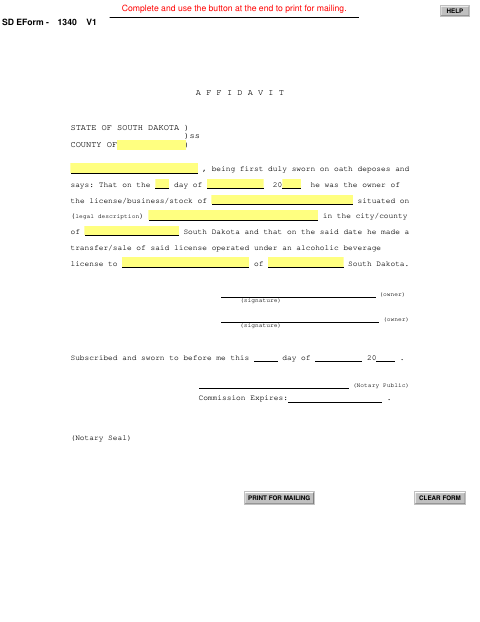
The affidavit identifies the prior owner, the license or business and its location, and the person receiving the license through a transfer or sale. The prior owner completes and signs it under oath as part of documenting the license transfer; the form itself does not specify when the city requires submission or what other transfer materials are needed.
Who needs it
The owner who transferred or sold the alcoholic beverage license completes this affidavit, identifying the license or business, its location, and the recipient.
How to get this notarized
- 1
Download the Affidavit
Get the Affidavit for Transfer of Alcoholic Beverage License from the City of Deadwood.
- 2
Fill In the Transfer Details
Complete the owner, license or business, location, transfer date, and recipient information requested on the form.
- 3
Book an Online Notary
Arrange a session with a commissioned online notary before signing the affidavit.
- 4
- 5
Submit to the City
Submit the completed, notarized affidavit to the City of Deadwood with your transfer paperwork.
Preview the form
The blank PDF straight from Deadwood. Look it over, then upload your filled copy to start the notary session.

You’ll need ID and a webcam.
A licensed online notary will join you on video, verify your government-issued ID, witness your signature, and apply their seal. You’ll receive the notarized PDF by email when the session ends.
Frequently asked questions
- How do I complete the alcohol license transfer affidavit?
- Enter the owner, license or business, location, transfer date, and recipient details shown on the form. Sign the affidavit before a notary, then submit it with your transfer paperwork.
- Do I need to sign this affidavit in front of a notary?
- Yes. The form says it must be subscribed and sworn before a notary public, and includes a space for the notary’s commission expiration and seal.
- Can I use an online notary for this affidavit?
- South Dakota authorizes remote online notarization by its notaries under SDCL 18-1-11.2. SDCL 18-1-14 recognizes acts by a notary public of another state when performed according to that state’s law.
- What should I do if I am unsure about the city’s filing requirements?
- The form does not state when it must be filed or list supporting materials. Contact the city to confirm its transfer process and any additional requirements; confirm with the city if unsure.
Affidavit for Transfer of Alcoholic Beverage License in other South Dakota cities
Each city publishes its own version of this form. Pick the city where you’re filing.