
Langford, SD · Marshall County
Municipal Nominating Petition
This petition lets a candidate seek a municipal office and gathers qualified voters’ signatures; the candidate completes the declaration, and the circulator verifies the petition under oath.
- licensed online notary
- ~15 min average
- Notarized PDF emailed
What you’ll need
- Government-issued photo ID
- Webcam-enabled device (laptop or phone)
- This form, ready to upload as a PDF
What this form is
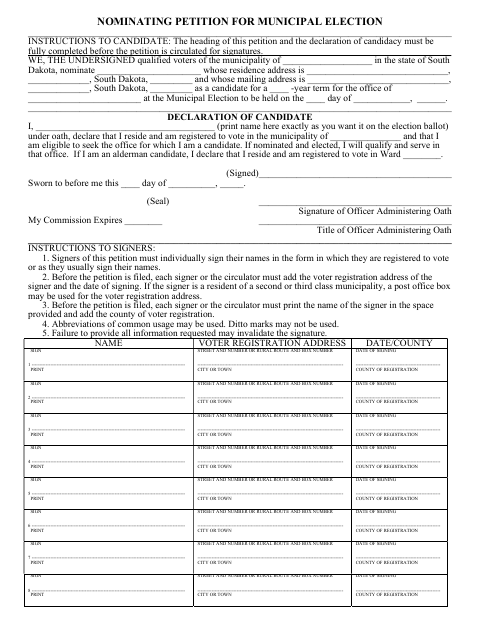
The petition names a candidate and office, includes the candidate’s sworn declaration, provides spaces for voter signatures, and ends with the circulator’s sworn verification. The candidate must complete the heading and declaration before circulation, and the circulator completes the verification after collecting signatures and before filing. The form instructions say petitions are submitted to the municipal finance officer and describe requirements for signatures, circulation, and filing deadlines.
Who needs it
A person seeking a municipal office uses this petition to collect voter signatures, while the circulator completes its verification after witnessing the signatures.
How to get this notarized
- 1
Download the Petition
Get the municipal nominating petition and instructions.
- 2
Complete the Candidate Section
Fill in the heading and declaration of candidacy before circulating the petition.
- 3
Collect Signatures
Have qualified voters complete the signature information; the circulator must witness each signature.
- 4
Book an Online Notary
Arrange an online notarization for the candidate’s declaration or the circulator’s verification, as applicable.
- 5
Sign on Video
Sign the applicable sworn statement before the commissioned online notary during the video session.
- 6
Submit to the City
Complete the petition and submit it to the municipal finance officer as directed.
Preview the form
The blank PDF straight from Langford. Look it over, then upload your filled copy to start the notary session.

You’ll need ID and a webcam.
A licensed online notary will join you on video, verify your government-issued ID, witness your signature, and apply their seal. You’ll receive the notarized PDF by email when the session ends.
Frequently asked questions
- How do I complete the petition’s notarized sections?
- Complete the candidate declaration before circulation. After collecting signatures, the circulator completes the verification. Each person signs the applicable sworn statement before the officer administering the oath.
- Do I need to notarize both sworn statements?
- The form contains separate sworn sections for the candidate and the circulator. Each signer must appear before an officer administering the oath for the applicable statement.
- Can I use a commissioned online notary?
- South Dakota authorizes remote online notarization for its own notaries under SDCL 18-1-11.2. SDCL 18-1-14 recognizes acts by a notary from another state when performed in compliance with that state’s law. Confirm with the city if unsure.
- Where does the completed petition go?
- The form instructions say petitions are submitted to the municipal finance officer. They also advise submitting with ample time before the deadline.