
Box Elder, SD · Pennington County
Petition to Vacate Public Right-of-Way or Section Line Highway
This petition records adjoining property owners’ consent to vacating a described public right-of-way or section line highway and is submitted by the owners to Box Elder’s Planning Department.
- licensed online notary
- ~15 min average
- Notarized PDF emailed
What you’ll need
- Government-issued photo ID
- Webcam-enabled device (laptop or phone)
- This form, ready to upload as a PDF
What this form is
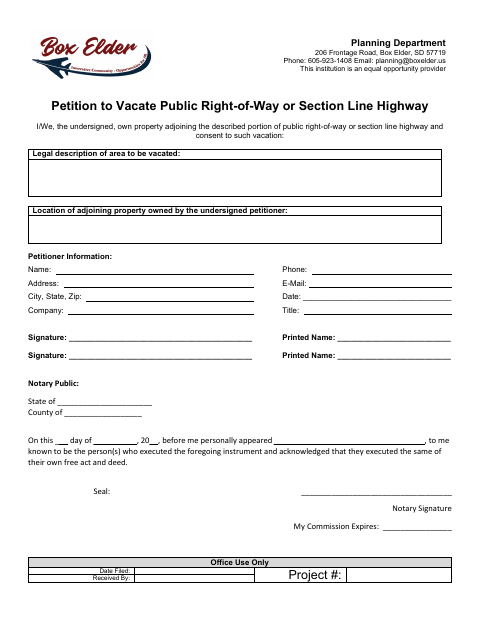
The petition identifies the area proposed for vacation and the adjoining property owned by the petitioner, along with petitioner contact information and signatures. It is for adjoining property owners who consent to vacating a public right-of-way or section line highway. The form is addressed to the Box Elder Planning Department; contact the department about filing the completed petition and any additional requirements.
Who needs it
Property owners adjoining the described public right-of-way or section line highway use this petition to record their consent to its vacation.
Why it needs a notary
The form contains an acknowledgment stating that the signer appeared before the notary and acknowledged signing; each petitioner signing should do so before the notary.
How to get this notarized
- 1
Download the Petition
Get the Petition to Vacate Public Right-of-Way or Section Line Highway from the Box Elder Planning Department.
- 2
Fill In the Petition
Provide the area’s legal description, adjoining property location, petitioner information, and date.
- 3
Book an Online Notary
Arrange an appointment with a commissioned online notary for the acknowledgment.
- 4
Sign on Video
Sign before the notary during your online appointment and complete the acknowledgment.
- 5
Submit to the City
Contact the Box Elder Planning Department to confirm how to submit the completed petition.
Preview the form
The blank PDF straight from Box Elder. Look it over, then upload your filled copy to start the notary session.

You’ll need ID and a webcam.
A licensed online notary will join you on video, verify your government-issued ID, witness your signature, and apply their seal. You’ll receive the notarized PDF by email when the session ends.
Frequently asked questions
- How do I submit the completed petition?
- The form is addressed to the Box Elder Planning Department. Contact the department using the phone number or email on the form to ask how to file your completed petition.
- Do I need to sign the petition before a notary?
- Yes. The petition includes a notary acknowledgment stating that the signer appeared before the notary and acknowledged executing the instrument.
- Can I use a commissioned online notary?
- South Dakota authorizes remote online notarization for its own notaries under SDCL 18-1-11.2. Ask the Planning Department if unsure whether your notarized petition meets its filing requirements.
- Who should complete this petition?
- The form is for owners of property adjoining the described portion of public right-of-way or section line highway who consent to its vacation.