
Ashland City, TN · Cheatham County
Homeowner Building Permit Affidavit
This affidavit is for property owners applying for a homeowner building permit in Ashland City to confirm residence, ownership, intended personal use, and responsibility for the work.
- licensed online notary
- ~15 min average
- Notarized PDF emailed
What you’ll need
- Government-issued photo ID
- Webcam-enabled device (laptop or phone)
- This form, ready to upload as a PDF
What this form is
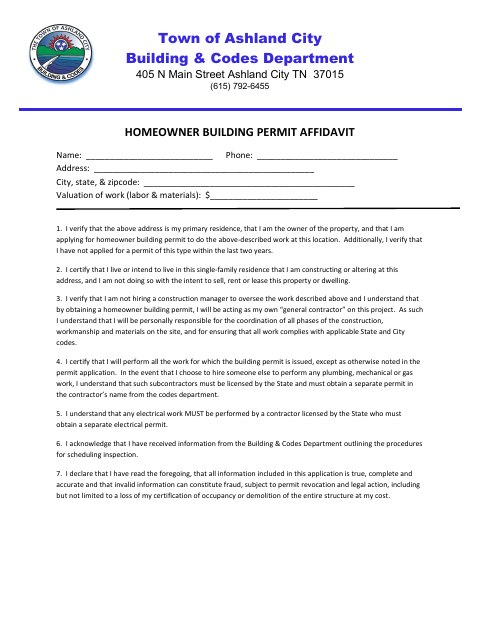
Ashland City’s Building & Codes Department uses this affidavit with a homeowner building permit application. The owner confirms the property is their primary residence, that they intend to live in the single-family home, and that the work is not for resale, rent, or lease. The affidavit also describes the owner’s responsibilities for coordinating work and following applicable codes, and explains requirements for certain licensed subcontractors and electrical work.
Who needs it
A property owner applying for a homeowner building permit in Ashland City should complete this affidavit and affirm the statements about the property and planned work.
Why it needs a notary
The form has a sworn acknowledgment block; the homeowner named in the affidavit signs before the notary, who completes the appearance, date, signature, and commission-expiration fields.
How to get this notarized
- 1
Download the Affidavit
Get the Homeowner Building Permit Affidavit from the Ashland City Building & Codes Department.
- 2
Fill In Your Information
Enter your contact and property details, work valuation, and other requested information. Wait to sign until your notary appointment.
- 3
Book an Online Notary
Schedule a video appointment with a commissioned online notary.
- 4
- 5
Submit to the City
Provide the completed affidavit to Ashland City Building & Codes with your homeowner building permit application.
Preview the form
The blank PDF straight from Ashland City. Look it over, then upload your filled copy to start the notary session.

You’ll need ID and a webcam.
A licensed online notary will join you on video, verify your government-issued ID, witness your signature, and apply their seal. You’ll receive the notarized PDF by email when the session ends.
Frequently asked questions
- How do I get the homeowner permit affidavit notarized?
- Complete the form, then book an online appointment with a commissioned online notary. Sign during the video session so the notary can complete the sworn acknowledgment block.
- Do I need to sign the affidavit in front of a notary?
- Yes. The form includes a notarial block stating that the homeowner personally appeared, was duly sworn, and acknowledged executing the affidavit. Sign before the notary completes that block.
- Can I use an online notary for this form?
- Tennessee authorizes remote online notarization by a commissioned online notary registered through the Secretary of State. Confirm with the city or town if unsure whether it will accept your remotely notarized affidavit.
- What does the affidavit ask me to confirm?
- It asks you to confirm ownership and primary residence, intended personal use of the single-family home, and your responsibilities for the work, including applicable codes and certain contractor requirements.
Homeowner Building Permit Affidavit in other Tennessee cities
Each city publishes its own version of this form. Pick the city where you’re filing.