
Ardmore, TN · Giles County
Off-Premises Liquor Store Application
This application requests a certificate of compliance for a proposed off-premises liquor store and is completed by the individual or entity applying for the certificate.
- licensed online notary
- ~15 min average
- Notarized PDF emailed
What you’ll need
- Government-issued photo ID
- Webcam-enabled device (laptop or phone)
- This form, ready to upload as a PDF
What this form is
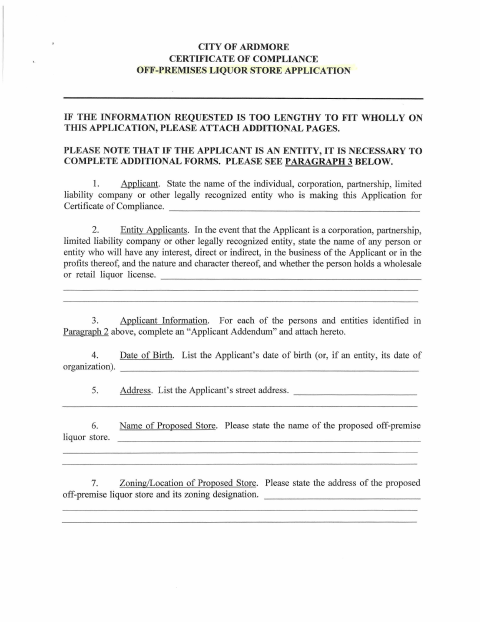
The four-page application asks for applicant and ownership details, the proposed store’s address and zoning, information about the location’s owner, and certifications about legal compliance. It also requests supporting materials, including a scale plan and, for entity applicants, additional forms and organizational documents. Although headed City of Ardmore, the supplied form text refers to Farragut and the Town of Farragut; confirm with the city or town if unsure which application to use.
Who needs it
An individual or entity seeking a certificate of compliance for a proposed off-premises liquor store, with entity applicants also completing the referenced addenda and supporting forms.
Why it needs a notary
The form includes an individual applicant acknowledgment; the applicant signs before the notary, while the supplied text shows only the heading for an entity acknowledgment block.
How to get this notarized
- 1
Download the Application
Get the off-premises liquor store application and check with the city or town about the form, since its text references Farragut despite the Ardmore heading.
- 2
Complete the Application
Fill in the applicant, ownership, proposed store, location, and compliance information, and gather the supporting documents required for your applicant type.
- 3
Book an Online Notary
Schedule an online notarization for the applicant acknowledgment before signing.
- 4
Sign on Video
Meet with the commissioned online notary by video and sign the applicable acknowledgment block as directed.
- 5
Submit to the City
Submit the completed application and attachments to the appropriate city or town office, after confirming where this form should be filed.
Preview the form
The blank PDF straight from Ardmore. Look it over, then upload your filled copy to start the notary session.

You’ll need ID and a webcam.
A licensed online notary will join you on video, verify your government-issued ID, witness your signature, and apply their seal. You’ll receive the notarized PDF by email when the session ends.
Frequently asked questions
- How do I complete the liquor store application?
- Provide the requested applicant, ownership, location, and compliance details, then gather the supporting materials listed on the form. The form text references Farragut despite its Ardmore heading, so confirm which application to use.
- Do I need to sign the application in front of a notary?
- The individual applicant signature block includes an acknowledgment before a notary. The supplied text also indicates an entity acknowledgment block, but does not include its full wording.
- Can I sign with a commissioned online notary?
- Tennessee authorizes remote online notarization by a commissioned online notary registered through the Secretary of State. Check with the receiving city or town whether it accepts a remotely notarized application.
- What supporting documents does the form request?
- The application requests a scale plan and, depending on the applicant’s structure, addenda and items such as partnership agreements, corporate charters, operating agreements, ownership lists, and Alcoholic Beverage Commission materials.