
Nolanville, TX · Bell County
Development Flow Chart
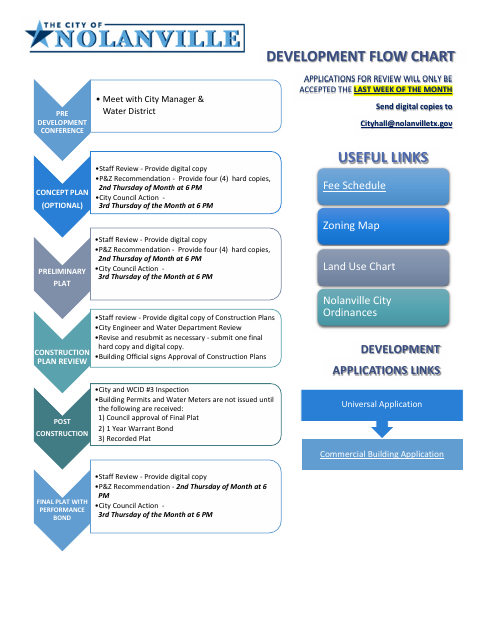
This two-page chart outlines Nolanville’s development review steps for developers submitting concept plans, plats, construction plans, or other development applications to the city.
- licensed online notary
- ~15 min average
- Notarized PDF emailed
What you’ll need
- Government-issued photo ID
- Webcam-enabled device (laptop or phone)
- This form, ready to upload as a PDF
What this form is
The chart shows the review sequence for concept plans, preliminary plats, construction plans, and final plats with performance bonds, including staff, Planning and Zoning, City Council, and inspection steps. It also lists submission formats, meeting timing, and conditions for building permits and water meters. Use it to identify the steps and materials associated with a development application; the form says applications for review are accepted only during the last week of the month.
Who needs it
Developers preparing a concept plan, preliminary or final plat, construction plan, or other development application for review by the City of Nolanville need this chart.
Why it needs a notary
The form includes a notary-public block for the Developer Representative’s signature; the representative signs before the notary as part of the submission.
How to get this notarized
- 1
Download the Chart
Download the Development Flow Chart and identify the review steps for your plan or plat.
- 2
Fill In Your Details
Complete the Developer Company, address, city, state, ZIP, phone, signature, and title lines as applicable.
- 3
Book an Online Notary
Book a commissioned online notary for the Developer Representative’s signature, and confirm acceptance with the city if unsure.
- 4
Sign on Video
Sign the Developer Representative line during the online notary session.
- 5
Submit to the City
Send digital copies to [email protected], following the chart’s review steps and timing.
Preview the form
The blank PDF straight from Nolanville. Look it over, then upload your filled copy to start the notary session.

You’ll need ID and a webcam.
A licensed online notary will join you on video, verify your government-issued ID, witness your signature, and apply their seal. You’ll receive the notarized PDF by email when the session ends.
Frequently asked questions
- How do I use the development flow chart?
- Follow the chart for the applicable plan or plat review, note the listed copies and review steps, then submit digital copies to the city as directed.
- Do I need to sign this form before a notary?
- The chart includes a notary-public block beneath the Developer signature and title lines. The Developer Representative signs before the notary.
- Can I sign this form with an online notary?
- Texas has authorized remote online notarization since 2018 under Government Code Chapter 406, Subchapter C. Ask the city whether it accepts this form notarized by a commissioned online notary; confirm with the city if unsure.
- When does Nolanville accept development applications for review?
- The chart states that applications for review will only be accepted during the last week of the month. It directs applicants to send digital copies to [email protected].