
Angleton, TX · Brazoria County
Application for Retail Food Permit
This application requests a City of Angleton retail food permit and is for business owners or responsible parties operating a food establishment, store, bar, or other listed facility.
- licensed online notary
- ~15 min average
- Notarized PDF emailed
What you’ll need
- Government-issued photo ID
- Webcam-enabled device (laptop or phone)
- This form, ready to upload as a PDF
What this form is
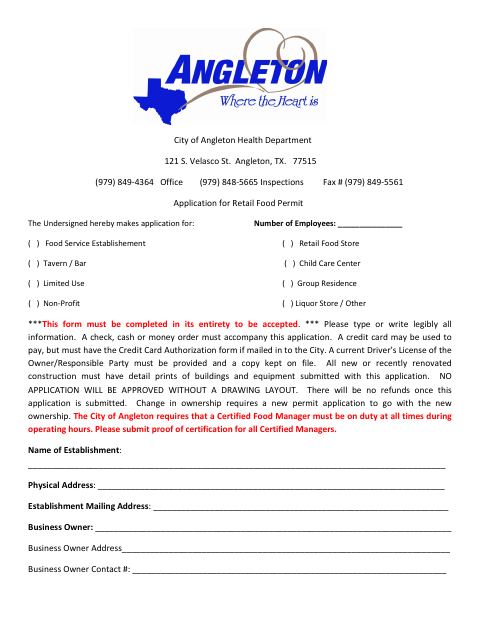
The application collects establishment, owner, building, and emergency-contact details, along with the number of employees and the type of facility. Angleton requires the completed application, payment, a copy of the owner or responsible party’s driver’s license, and a drawing layout; new or recently renovated construction must also submit detailed building and equipment prints. A change in ownership requires a new application.
Who needs it
Business owners or responsible parties seeking an Angleton permit for a food establishment, retail food store, bar, child care center, or other listed facility need this application.
Why it needs a notary
The form has a sworn jurat block labeled Acknowledgment; each business owner or responsible party signing the application must appear before the notary and swear the application is true.
How to get this notarized
- 1
Download the Application
Get the Retail Food Permit application from the City of Angleton.
- 2
Complete the Form
Fill in the establishment and contact details, select the facility type, and provide the employee count. Gather the required supporting documents.
- 3
Book an Online Notary
Schedule an appointment with a commissioned online notary for the sworn statement.
- 4
Sign on Video
Appear by video, take the required oath, and sign the application as directed by the notary.
- 5
Submit to the City
Submit the notarized application, payment, and required supporting materials to the City of Angleton.
Preview the form
The blank PDF straight from Angleton. Look it over, then upload your filled copy to start the notary session.

You’ll need ID and a webcam.
A licensed online notary will join you on video, verify your government-issued ID, witness your signature, and apply their seal. You’ll receive the notarized PDF by email when the session ends.
Frequently asked questions
- How do I complete the notarized portion of this permit application?
- Fill out the application, then sign and swear to its truth before a notary. Do not sign the sworn section in advance; bring the completed form to your online notary appointment.
- Do I need a notary for the retail food permit application?
- Yes. The application includes a sworn statement and a notary block. The business owner or responsible party signing the application must swear that its facts are true and correct.
- Can I use an online notary for this form?
- Texas has authorized remote online notarization since 2018, and acknowledgments taken by notaries of other states are recognized. The form requires a sworn statement, so confirm with the city if unsure whether it will accept your online notarization.
- What should I submit with the application?
- The form calls for payment, a copy of the owner or responsible party’s current driver’s license, and a drawing layout. New or recently renovated construction must also include detailed building and equipment prints.