
Dimmitt, TX · Castro County
Small Business Incentive Program Application
This seven-page application lets Dimmitt businesses request incentive assistance for projects such as property improvements, technology, or marketing, with supporting information and attachments.
- licensed online notary
- ~15 min average
- Notarized PDF emailed
What you’ll need
- Government-issued photo ID
- Webcam-enabled device (laptop or phone)
- This form, ready to upload as a PDF
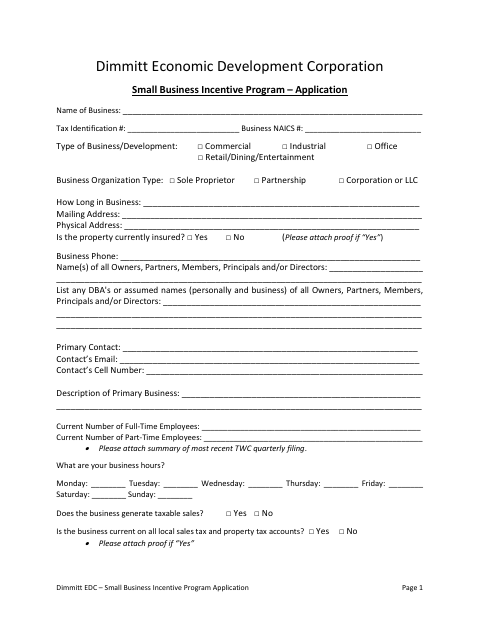
What this form is
The Dimmitt Economic Development Corporation application collects business, ownership, employment, project, and cost information from businesses seeking Small Business Incentive Program assistance. Applicants identify planned improvements or other projects and provide supporting materials, which may include bids, photos, financial records, and plans. The packet also includes a consumer report authorization, reference sheet, checklist, and property owner authorization; the application and attachments remain confidential until an agreement is signed by both parties.
Who needs it
Dimmitt businesses applying for incentive assistance should complete the application, and a property owner must complete the authorization if the applicant needs permission to make improvements.
Why it needs a notary
The property owner authorization on page 7 carries a Texas jurat; the property owner signs and swears to the statement before the notary.
How to get this notarized
- 1
Download the Application
Get the Small Business Incentive Program application packet from the City of Dimmitt.
- 2
Complete the Application
Fill in the business, owner, project, and cost details, and gather the supporting items listed in the checklist.
- 3
Book an Online Notary
Schedule a video appointment for the property owner authorization’s jurat.
- 4
Sign on Video
The property owner signs and swears to the authorization before the commissioned online notary.
- 5
Submit to the City
Return the completed application and attachments to the Dimmitt Economic Development Corporation as directed in the packet.
Preview the form
The blank PDF straight from Dimmitt. Look it over, then upload your filled copy to start the notary session.

You’ll need ID and a webcam.
A licensed online notary will join you on video, verify your government-issued ID, witness your signature, and apply their seal. You’ll receive the notarized PDF by email when the session ends.
Frequently asked questions
- How do I get the property owner authorization notarized?
- Complete the property and business details, then have the property owner sign and swear to the authorization before a commissioned online notary during a video appointment.
- Do I need to notarize the entire application?
- The notary block appears on the property owner authorization on page 7. The form text does not identify other sections as requiring notarization; confirm with the city if unsure.
- Can I sign this form with an online notary?
- Texas has authorized remote online notarization since 2018 under Government Code Chapter 406, Subchapter C. A commissioned online notary can notarize the property owner’s sworn statement by video.
- What should I submit with the application?
- The checklist requests supporting items such as financial statements, tax returns, employee information, references, ownership or property owner authorization, project plans, current photos, and cost estimates.