
Princeton, TX · Collin County
Agent Authorization
The Agent Authorization form lets a Princeton property owner identify a project representative or choose to represent themselves when submitting and processing a development application.
- licensed online notary
- ~15 min average
- Notarized PDF emailed
What you’ll need
- Government-issued photo ID
- Webcam-enabled device (laptop or phone)
- This form, ready to upload as a PDF
What this form is
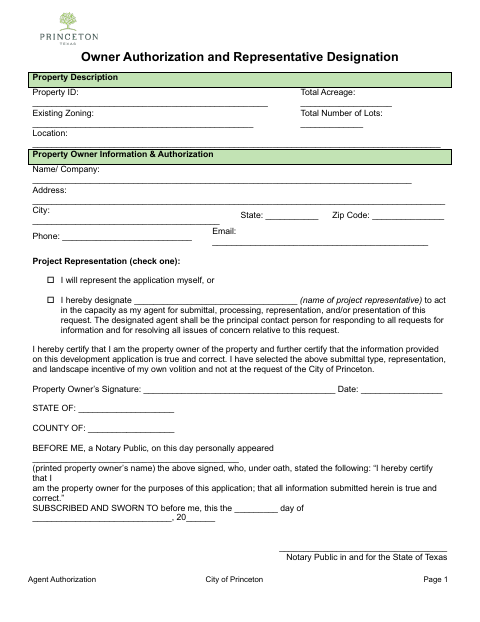
Use this form to provide property details, owner contact information, and the owner's choice of project representation for a development application. The owner can act as their own representative or designate an agent to handle submittal, processing, representation, or presentation of the request. The owner certifies that they own the property and that the submitted information is true and correct, then signs the sworn statement before a notary.
Who needs it
A property owner submitting a development application who needs to certify ownership and information and either designate a project representative or represent themselves needs this form.
Why it needs a notary
The form contains a subscribed-and-sworn jurat: the property owner signs and swears to the ownership and accuracy statement before the notary.
How to get this notarized
- 1
Download The Form
Get the Agent Authorization form from the City of Princeton.
- 2
Fill In The Form
Enter property and owner details, choose who will represent the application, and add representative information if applicable. Leave the sworn signature for the notary appointment.
- 3
Book An Online Notary
Schedule a remote online notarization session with a commissioned online notary.
- 4
Sign On Video
Show identification and sign and swear to the owner statement during the video session.
- 5
Submit To The City
Return the notarized form with your development application to the City of Princeton.
Preview the form
The blank PDF straight from Princeton. Look it over, then upload your filled copy to start the notary session.

You’ll need ID and a webcam.
A licensed online notary will join you on video, verify your government-issued ID, witness your signature, and apply their seal. You’ll receive the notarized PDF by email when the session ends.
Frequently asked questions
- How do I get the Agent Authorization notarized online?
- Complete the form without signing the sworn statement, book an online session, and sign before a commissioned online notary during the video appointment. Submit the notarized form with your development application.
- Do I need to designate a project representative?
- No. The form lets the owner choose to represent the application personally or designate a representative to handle the request.
- Can a commissioned online notary notarize this form?
- Texas has authorized remote online notarization since 2018 under Gov't Code ch. 406, subch. C. The form's owner signature is sworn before a notary.
- What information does the form ask for?
- It requests property details and owner contact information, the owner's representation choice, and representative details if an agent is designated. Confirm with the city if unsure which application materials to submit.