
Columbus, TX · Colorado County
Municipal Court Reply Form
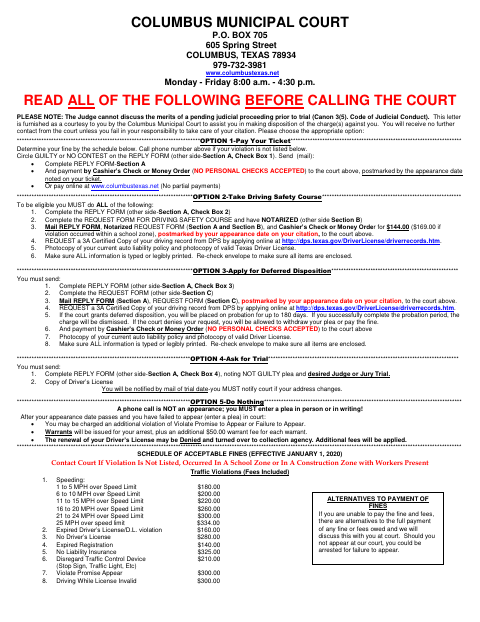
This form lets a person cited by Columbus Municipal Court enter a plea and request a driving safety course, deferred disposition, payment, or trial; the driving safety course affidavit requires notarization.
- licensed online notary
- ~15 min average
- Notarized PDF emailed
What you’ll need
- Government-issued photo ID
- Webcam-enabled device (laptop or phone)
- This form, ready to upload as a PDF
What this form is
The two-page form allows a person cited by Columbus Municipal Court to enter a plea and choose how to respond to a citation, including paying a fine, requesting a driving safety course or deferred disposition, or asking for trial. If requesting a driving safety course, the person must complete the Section B affidavit, sign it under oath before a notary, and send it with the required records, payment, and supporting documents by the appearance date.
Who needs it
A person cited by Columbus Municipal Court uses this form to enter a plea and request a payment option, driving safety course, deferred disposition, or trial.
How to get this notarized
- 1
Download The Reply Form
Get the two-page reply form from the Columbus Municipal Court and review the instructions and options.
- 2
Complete The Applicable Sections
Fill in Section A and, if requesting a driving safety course, complete the statements in Section B.
- 3
- 4
Sign On Video
Show identification and sign Section B during the video appointment when directed by the notary.
- 5
Submit The Form To The City
Send the reply form, notarized affidavit, and all other required items to the court by your appearance date.
Preview the form
The blank PDF straight from Columbus. Look it over, then upload your filled copy to start the notary session.

You’ll need ID and a webcam.
A licensed online notary will join you on video, verify your government-issued ID, witness your signature, and apply their seal. You’ll receive the notarized PDF by email when the session ends.
Frequently asked questions
- How do I get the driving safety course affidavit notarized?
- Complete Section B, then sign it under oath during a video appointment with a commissioned online notary. Include it with the other required documents and submit it to the court by your appearance date.
- Do I need to notarize the entire reply form?
- No. The notary block is in Section B, the affidavit for a driving safety course. The form does not show a notary block for Sections A or C.
- Can I use remote online notarization for Section B?
- Texas has authorized remote online notarization since 2018. You can sign during a video session with a commissioned online notary; confirm with the city if unsure.
- What else must I send with a driving safety course request?
- The form lists the reply form, notarized Section B, a certified driving record, proof of insurance and a valid Texas driver’s license, and the required cashier’s check or money order.