
Cedar Hill, TX · Dallas County
Driving Deferral Affidavit
This affidavit lets a person cited by a Cedar Hill police officer declare to Municipal Court that they will not drive during their deferral period until they have a valid driver’s license.
- licensed online notary
- ~15 min average
- Notarized PDF emailed
What you’ll need
- Government-issued photo ID
- Webcam-enabled device (laptop or phone)
- This form, ready to upload as a PDF
What this form is
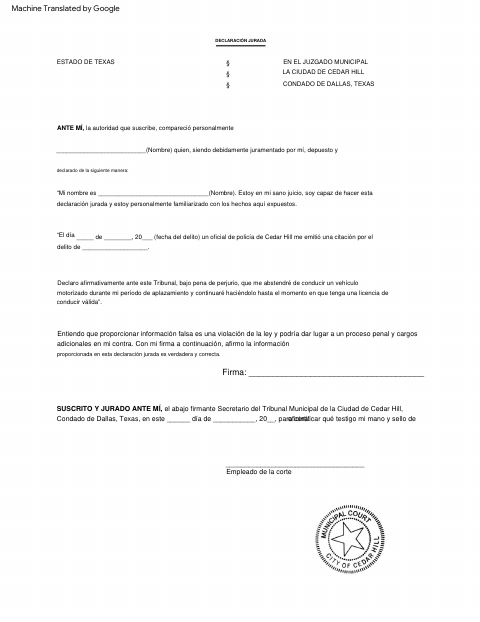
The signer states their name, confirms they are of sound mind and familiar with the facts, and identifies the citation and alleged offense. They also affirm that they will not drive during the deferral period until they have a valid driver’s license. The form says the declaration is sworn before the Cedar Hill Municipal Court clerk; ask the court how and when to submit it.
Who needs it
A person cited by a Cedar Hill police officer who must affirm to Municipal Court that they will refrain from driving during a deferral period until they have a valid license.
Why it needs a notary
The form’s jurat says the signer is sworn before the Municipal Court clerk; it does not provide a notary block, so ask the court whether a notary is acceptable.
How to get this notarized
- 1
Download The Affidavit
Get the driving deferral affidavit from the City of Cedar Hill.
- 2
Complete The Declaration
Enter your name, citation date, and alleged offense, then review the statement about refraining from driving.
- 3
Confirm The Signing Process
The form calls for an oath before the Municipal Court clerk. Confirm with the city if unsure whether it accepts an online notary instead.
- 4
Book An Online Notary If Accepted
If the city confirms online notarization is acceptable, book a commissioned online notary.
- 5
Sign During The Video Session
If directed to use an online notary, sign during the video session and follow the notary’s instructions.
- 6
Submit It To The City
Provide the completed affidavit to Cedar Hill Municipal Court using the submission method the court confirms.
Preview the form
The blank PDF straight from Cedar Hill. Look it over, then upload your filled copy to start the notary session.

You’ll need ID and a webcam.
A licensed online notary will join you on video, verify your government-issued ID, witness your signature, and apply their seal. You’ll receive the notarized PDF by email when the session ends.
Frequently asked questions
- What does this driving deferral affidavit say?
- It states that the signer received a citation from a Cedar Hill police officer and will not drive during the deferral period until they have a valid driver’s license.
- Who signs the affidavit?
- The person making the declaration signs it. The form says the declaration is sworn before the undersigned Cedar Hill Municipal Court clerk.
- Do I need to sign this before a notary?
- The form names the Municipal Court clerk, not a notary, as the person before whom the declaration is sworn. Texas permits online notarization, but confirm with the city if unsure whether it accepts that for this form.
- How do I submit the completed affidavit?
- The form does not give submission instructions. Contact Cedar Hill Municipal Court to confirm how and when to provide the signed affidavit.