
Cockrell Hill, TX · Dallas County
Contractor Fire Permit Application
Contractors use this application to request a fire permit for proposed construction, remodeling, renovation, commercial, or multifamily work in Cockrell Hill.
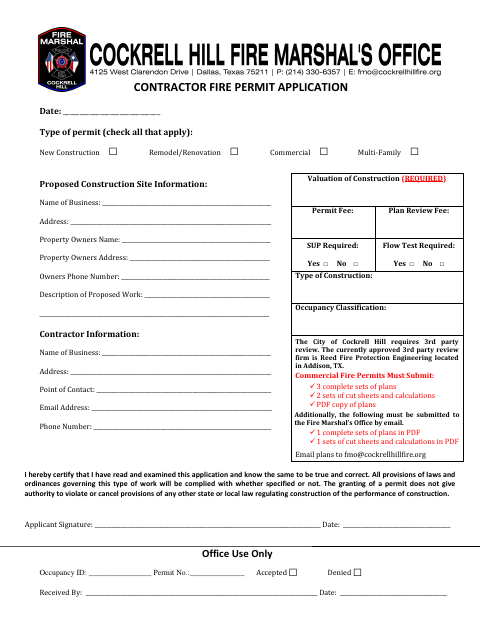
What this form is
The application collects the proposed work type, construction site and property owner details, contractor contact information, and a description of the work. It also has sections for city staff to record permit information and construction details. Commercial fire permit submissions must include plans, cut sheets, and calculations; the form says the city requires third-party review.
Who needs it
Contractors proposing construction or remodeling work in Cockrell Hill can use this application to provide project and contractor information for fire permit review.
How to submit it
Email plans to [email protected]. The form also says the Fire Marshal’s Office must receive the listed PDF plans, cut sheets, and calculations by email.
About notarization
This application is signed and dated without a notary; it lists plans, cut sheets, and calculations as attachments, with no notarized or sworn attachment.
How to submit this form
- 1
Download the Application
Download the Contractor Fire Permit Application PDF.
- 2
Complete the Application
Enter the permit type, site and property owner details, contractor information, and proposed work description.
- 3
Gather Required Materials
For commercial fire permits, prepare the plan sets, cut sheets, calculations, and PDF copy of plans listed on the form.
- 4
Email Plans to the City
Email plans to [email protected]; the form says the listed PDF materials must be submitted to the Fire Marshal’s Office by email.
Frequently asked questions
- What is the Contractor Fire Permit Application for?
- It collects project, property owner, and contractor information for proposed work, including construction, remodeling or renovation, commercial, and multifamily projects.
- What documents are listed for commercial fire permits?
- The form lists three complete plan sets, two sets of cut sheets and calculations, and a PDF copy of the plans. It also describes additional PDF submission requirements.
- Do I need a notary for the Contractor Fire Permit Application?
- No. The application is signed and dated without a notary. It lists plans, cut sheets, and calculations as attachments, but does not identify any notarized or sworn attachment.
- How do I submit the Contractor Fire Permit Application?
- The form directs applicants to email plans to [email protected] and says the listed PDF plans, cut sheets, and calculations must be submitted to the Fire Marshal’s Office by email.
Need something notarized?
This Contractor Fire Permit Application doesn’t need a notary — but Texas residents can notarize other documents online with a commissioned online notary.