
Seagoville, TX · Dallas County
Fire Permit Application
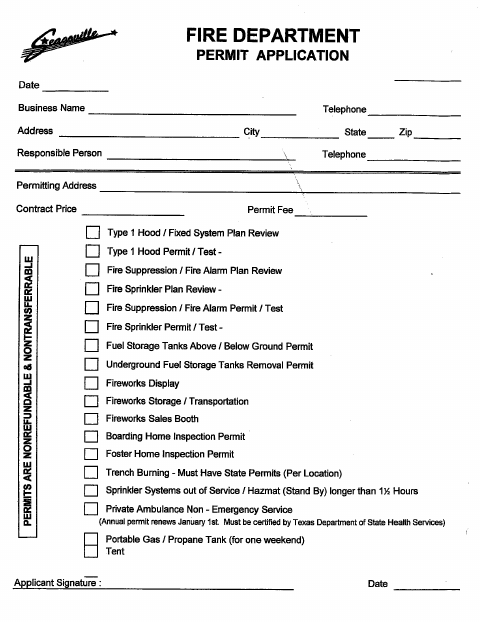
The Fire Department Permit Application lets businesses and applicants request listed fire-related permits by providing business, contact, permit, and signature details.
What this form is
This application is for requesting fire-related permits listed on the form, including permits for fire suppression, alarms, sprinklers, fuel storage, fireworks, and other activities. It asks for business and responsible-person contact details, permitting address, contract price, permit fee, permit type, and applicant signature and date. The form also states that permits are nonrefundable and nontransferable.
Who needs it
A business or applicant seeking one of the fire-related permits listed on the application should use this form.
How to submit it
The form identifies the Fire Department. Submit it to the city department named on the form; check the city website for current contact details.
About notarization
This application has no notary block; the applicant signs and dates it, and the document lists no notarized or sworn attachment or related step.
How to submit this form
- 1
Download The Application
Download the Seagoville Fire Department Permit Application.
- 2
Choose A Permit Type
Review the permit types listed on the form and identify the one you are requesting.
- 3
Complete The Application
Provide the requested business, contact, permitting address, contract price, and permit fee information.
- 4
Sign And Date The Form
Add the applicant signature and date in the spaces provided.
- 5
Submit To The City
Submit it to the city department named on the form; check the city website for current contact details.
Frequently asked questions
- What is the Seagoville Fire Permit Application for?
- It is used to request fire-related permits listed on the application, such as permits for fire alarms, sprinklers, fuel storage, fireworks, and other activities.
- Who uses this fire permit application?
- Businesses and applicants seeking a permit type listed on the form can provide business and contact information, permitting address, contract price, permit fee, and signature.
- Do I need a notary for the Fire Permit Application?
- No. This application has no notary block; the applicant signs and dates it. The document lists no notarized or sworn attachment or related step.
- How do I submit the Fire Permit Application?
- The form identifies the Fire Department but gives no submission address, email, or portal. Submit it to the city department named on the form and check the city website for current contact details.
Need something notarized?
This Fire Permit Application doesn’t need a notary — but Texas residents can notarize other documents online with a commissioned online notary.