
Corinth, TX · Denton County
Release, Assumption of Risk, and Indemnification Agreement
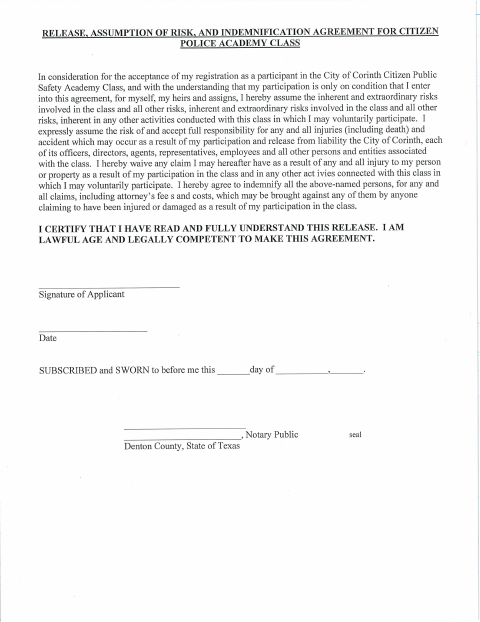
This one-page agreement documents an applicant’s assumption of risk, release of liability, and indemnification as a condition of registering for Corinth’s Citizen Public Safety Academy Class.
- licensed online notary
- ~15 min average
- Notarized PDF emailed
What you’ll need
- Government-issued photo ID
- Webcam-enabled device (laptop or phone)
- This form, ready to upload as a PDF
What this form is
The agreement states that participants accept the risks of the Citizen Public Safety Academy Class, release the City of Corinth and associated people and entities from liability, and agree to indemnify them for certain claims. Applicants must enter into the agreement as a condition of registration. The form also includes a sworn statement that the applicant has read and understands the release and is legally competent to agree.
Who needs it
Anyone registering to participate in the City of Corinth Citizen Public Safety Academy Class must complete this agreement as a condition of acceptance.
Why it needs a notary
The form carries a jurat stating it was subscribed and sworn before a notary; the applicant signs the agreement and swears to the statement before the notary.
How to get this notarized
- 1
Download the Agreement
Get the Release, Assumption of Risk, and Indemnification Agreement from the City of Corinth.
- 2
Review the Agreement
Read the release and confirm you understand its terms before signing.
- 3
Book an Online Notary
Schedule a remote session with a commissioned online notary.
- 4
Sign on Video
Sign and swear to the agreement during the video session before the notary.
- 5
Submit to the City
Send the notarized agreement to the City of Corinth as part of your registration.
Preview the form
The blank PDF straight from Corinth. Look it over, then upload your filled copy to start the notary session.

You’ll need ID and a webcam.
A licensed online notary will join you on video, verify your government-issued ID, witness your signature, and apply their seal. You’ll receive the notarized PDF by email when the session ends.
Frequently asked questions
- How do I get this agreement notarized online?
- Complete the agreement, book a session with a commissioned online notary, and sign and swear to it during the video session. Then submit the notarized agreement to the city.
- Do I need to sign the agreement in front of a notary?
- Yes. The form includes a jurat stating that it was subscribed and sworn before a notary, so sign and swear to the statement in the notary’s presence.
- Can I use an online notary for this form?
- Texas has authorized remote online notarization since 2018 under Government Code Chapter 406, Subchapter C. A commissioned online notary can perform the notarization remotely; confirm with the city if unsure.
- What does this agreement cover?
- It states that the academy participant assumes the risks of the class, releases the city and associated people and entities from liability, and agrees to indemnify them for certain claims.