
Midlothian, TX · Ellis County
Affidavit of Non-Prosecution
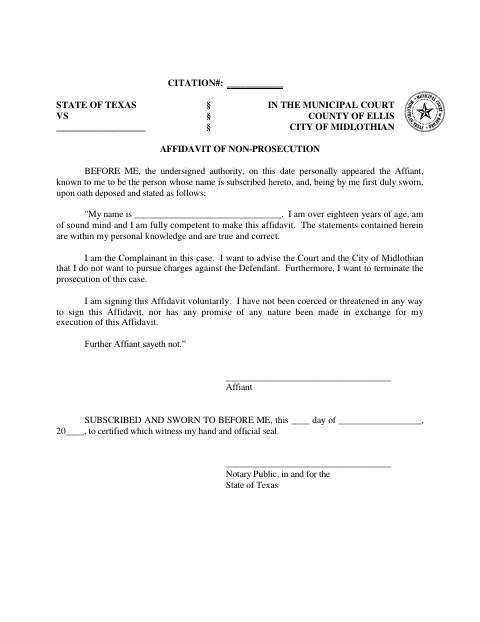
This affidavit lets a complainant tell the Midlothian Municipal Court and city that they do not want to pursue charges against the defendant or continue prosecution of the case.
- licensed online notary
- ~15 min average
- Notarized PDF emailed
What you’ll need
- Government-issued photo ID
- Webcam-enabled device (laptop or phone)
- This form, ready to upload as a PDF
What this form is
The affidavit identifies the signer as the complainant and records their statement that they do not want to pursue charges against the defendant or continue prosecution. It also states that the signer is acting voluntarily, without coercion or threats, and that the statements are based on personal knowledge. The form calls for the complainant to sign under oath; use it for the citation case identified on the form.
Who needs it
A complainant in a Midlothian municipal court case who wants to tell the court and city they do not wish to pursue charges or continue prosecution.
How to get this notarized
- 1
Download The Affidavit
Get the Affidavit of Non-Prosecution from the City of Midlothian and note the citation number for the case.
- 2
Fill In Your Information
Complete the affidavit with accurate information. Leave the signature and notary section unsigned until your appointment.
- 3
Book An Online Notary
Schedule a remote notarization session and prepare the required identification and completed form.
- 4
Sign And Take The Oath
Join by video, sign when directed, and swear to the statements before the commissioned online notary.
- 5
Submit It To The City
Follow the Midlothian Municipal Court or city instructions for submitting the notarized affidavit.
Preview the form
The blank PDF straight from Midlothian. Look it over, then upload your filled copy to start the notary session.

You’ll need ID and a webcam.
A licensed online notary will join you on video, verify your government-issued ID, witness your signature, and apply their seal. You’ll receive the notarized PDF by email when the session ends.
Frequently asked questions
- How do I get this affidavit notarized online?
- Complete the affidavit but wait to sign. Book an online session, show your identification, and sign while a commissioned online notary witnesses your oath and signature by video.
- Do I need to sign the affidavit in front of a notary?
- Yes. The form says it must be subscribed and sworn to before a notary, so sign and take the oath during the notarization.
- Can I use an online notary for this form?
- Texas has authorized remote online notarization since 2018 under Government Code Chapter 406, Subchapter C. Check with the court or city about accepting a remotely notarized jurat; confirm with the city if unsure.
- What should I do after the affidavit is notarized?
- The form is for the Midlothian Municipal Court and identifies a citation number. Ask the court or city how to submit the completed affidavit and whether any additional steps are needed.