
Dilley, TX · Frio County
Garbage Change Form
Customers use this form to request garbage service, change residential or commercial service, or terminate garbage service in Dilley.
What this form is
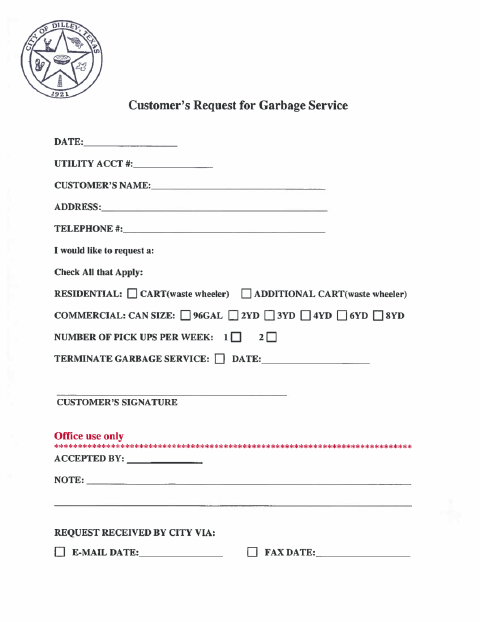
The form lets a customer request garbage service, select residential or commercial service options, or ask to terminate service. It asks for the date, utility account number, customer name, address, telephone number, service selections, and customer signature; termination requests also include a date. The city section records acceptance and whether the request was received by email or fax.
Who needs it
A customer requesting residential or commercial garbage service, an additional cart, a change in service, or termination can use this form.
How to submit it
Submit it to the city department named on the form; check the city website for current contact details.
About notarization
This form is signed without a notary; the customer just signs and dates it on the form.
How to submit this form
- 1
Download The Form
Download the Garbage Change Form PDF.
- 2
Complete Customer Details
Enter the date, utility account number, customer name, address, and telephone number.
- 3
Select Garbage Service
Check the applicable service request and provide container size, pickup frequency, or termination date as applicable.
- 4
Sign And Submit
Sign the form and submit it to the city department named on the form; check the city website for current contact details.
Frequently asked questions
- What can I request with the Garbage Change Form?
- Customers can request residential or commercial garbage service, an additional residential cart, or termination of garbage service. The form also provides fields for commercial container size and pickup frequency.
- How do I submit the Garbage Change Form?
- Submit it to the city department named on the form; check the city website for current contact details. The form includes office-use fields to record whether the request was received by email or fax.
- Do I need a notary for the Garbage Change Form?
- No. The customer signs and dates this form without a notary, and the document does not identify any attachment or related step that must be notarized or sworn.