
Jersey Village, TX · Harris County
New Vendor Setup/Change Form
Vendors complete this form to provide or update business, tax, contact, payment, and banking information for the City of Jersey Village.
What this form is
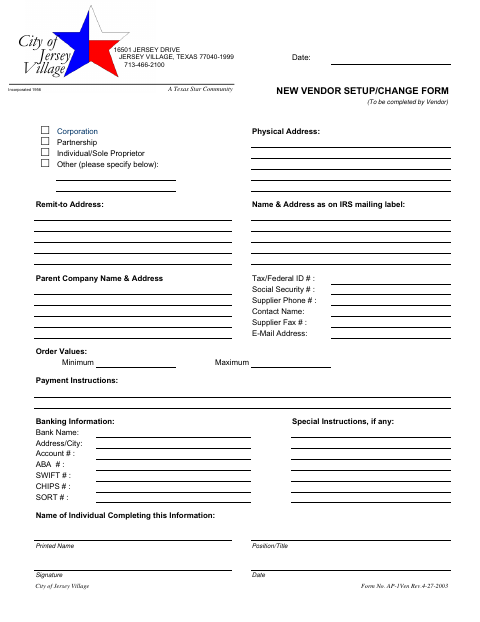
The New Vendor Setup/Change Form collects information for establishing or changing a vendor record with the City of Jersey Village. Vendors provide their business type, addresses, tax or Social Security number, contact details, payment instructions, and banking information. The form also asks for order values, any special instructions, and the printed name, position, signature, and date of the person completing it.
Who needs it
A vendor completing or changing its information for the City of Jersey Village should fill in this form.
How to submit it
Submit it to the city department named on the form; check the city website for current contact details. The form lists the City of Jersey Village address.
About notarization
This form is signed and dated without a notary; it asks the vendor’s representative to provide a signature and date and identifies no sworn or notarized attachment.
How to submit this form
- 1
Download The Form
Download the New Vendor Setup/Change Form PDF.
- 2
Complete Vendor Information
Fill in the vendor type, addresses, tax or Social Security number, contact details, order values, and payment instructions.
- 3
Add Banking Details
Complete the banking information fields and add any special instructions.
- 4
Sign And Date
Enter the completing individual's printed name and position or title, then sign and date the form.
- 5
Submit To The City
The form does not specify a submission method; check the city website for current contact details.
Frequently asked questions
- What is the New Vendor Setup/Change Form for?
- It collects vendor business, address, tax or Social Security, contact, payment, banking, and order-value information for the City of Jersey Village.
- Who completes this form?
- The form is marked for completion by the vendor. It also asks for the name, position or title, signature, and date of the person completing the information.
- How do I submit the New Vendor Setup/Change Form?
- The form does not give submission instructions. Submit it to the city department named on the form; check the city website for current contact details.
- Do I need a notary for the New Vendor Setup/Change Form?
- No. This form has a vendor signature and date field but no notary block. It identifies no sworn or notarized attachment.