
Donna, TX · Hidalgo County
Political Sign Registration Application
Donna candidates use this application to register political signs, provide election and candidate details, and acknowledge the city’s sign rules before submitting it.
- licensed online notary
- ~15 min average
- Notarized PDF emailed
What you’ll need
- Government-issued photo ID
- Webcam-enabled device (laptop or phone)
- This form, ready to upload as a PDF
What this form is
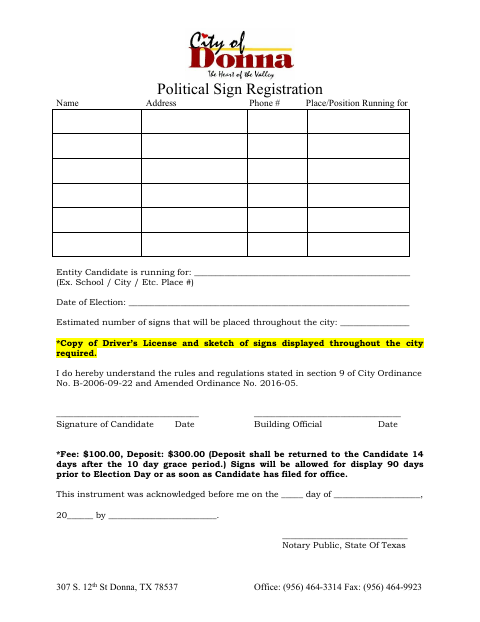
The application records the candidate’s contact information, office or entity, election date, and estimated number of signs to be placed throughout the city. It also requires a copy of the candidate’s driver’s license and a sketch of the signs, and includes a $100 fee and $300 deposit. The form states that signs may be displayed 90 days before Election Day or once the candidate has filed for office.
Who needs it
A candidate seeking to register political signs for display throughout Donna should complete this application and provide the requested license copy and sign sketch.
Why it needs a notary
The form carries an acknowledgment before a notary public; the candidate named in the acknowledgment signs before the notary.
How to get this notarized
- 1
Download the Application
Get the Political Sign Registration Application from the City of Donna.
- 2
Fill In the Candidate Details
Enter your contact information, office or entity, election date, and estimated number of signs.
- 3
Book an Online Notary
Arrange a video appointment with a commissioned online notary to acknowledge your signature.
- 4
Sign on Video
Sign the application during the online notary session and complete the acknowledgment.
- 5
Submit to the City
Include the required driver’s license copy and sign sketch when submitting the application to the city.
Preview the form
The blank PDF straight from Donna. Look it over, then upload your filled copy to start the notary session.

You’ll need ID and a webcam.
A licensed online notary will join you on video, verify your government-issued ID, witness your signature, and apply their seal. You’ll receive the notarized PDF by email when the session ends.
Frequently asked questions
- How do I get the political sign application notarized online?
- Complete the form, then meet with a commissioned online notary by video and acknowledge your signature. Texas has authorized remote online notarization since 2018.
- Do I need to bring anything besides the application?
- The form calls for a copy of your driver’s license and a sketch of the signs to be displayed throughout the city.
- What does the form say about fees and sign timing?
- It lists a $100 fee and a $300 deposit, and says signs may be displayed 90 days before Election Day or once the candidate has filed for office.
- Can an out-of-state notary take the acknowledgment?
- Texas recognizes acknowledgments taken by notaries of other states. Confirm with the city if unsure whether it will accept your completed form.