
Hubbard, TX · Hill County
Building Permit and Contractor Form
Property owners and contractors use this Hubbard form to provide project, property, and contractor information for a building permit.
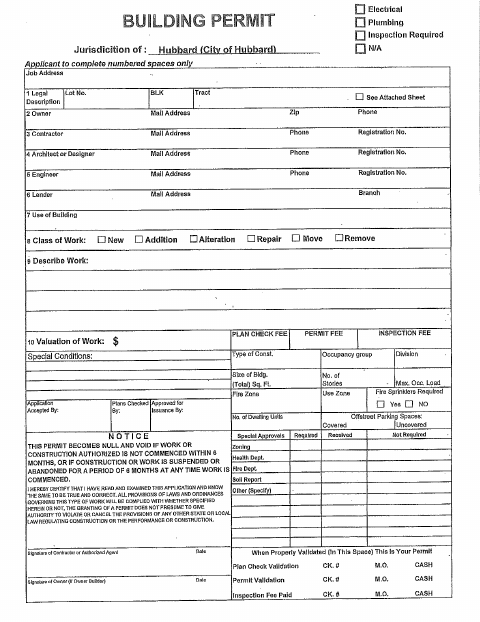
What this form is
This application collects information for a building permit in Hubbard, including the job address, property owner, type of work, building use, and work valuation. It also requests contact and license details for contractors and project professionals, along with signatures and dates. The form includes sections for permit review, fees, inspections, and special approvals.
Who needs it
Property owners and contractors use this form to submit building project details and contractor information for a Hubbard building permit.
How to submit it
Submit it to the city department named on the form; check the city website for current contact details.
About notarization
This document is signed without a notary; the signer just signs and dates it.
How to submit this form
- 1
Download The Form
Download the Building Permit and Contractor Form for Hubbard.
- 2
Complete The Form
Enter the requested property, project, owner, and contractor information.
- 3
Gather Attachments
The form refers to an attached sheet for the tract description when applicable.
- 4
Submit To The City
Submit the completed form to the city department named on it; check the city website for current contact details.
Frequently asked questions
- What information does the Hubbard building permit form request?
- It asks for the job address, owner and contractor details, type and description of work, building use, work valuation, and signatures.
- Who uses the Building Permit and Contractor Form?
- Property owners and contractors use the form to provide information about a building project in Hubbard, including contractor contact and license details.
- How do I submit the Hubbard building permit form?
- Submit it to the city department named on the form; check the city website for current contact details.
- Do I need a notary for the Hubbard building permit form?
- No. This document is signed without a notary; the signer just signs and dates it.