
Oak Ridge North, TX · Montgomery County
Electronic Bank Draft Payment Form
Utility customers use this form to add, remove, or change the bank account used for monthly electronic bill payments.
What this form is
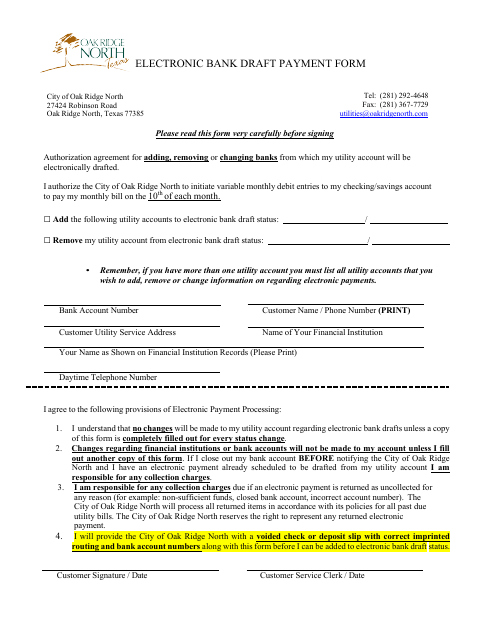
This form authorizes the City of Oak Ridge North to debit a checking or savings account for a monthly utility bill on the 10th of each month. Use it to add an account to electronic bank draft, remove an account, or change bank information. It requests utility account and service details, customer and bank information, and a signature; adding an account also requires a voided check or deposit slip.
Who needs it
Utility customers who want to add, remove, or change bank information for electronic draft payments complete this form.
How to submit it
Submit it to the city department named on the form; check the city website for current contact details.
About notarization
This form is signed and dated without a notary; include a voided check or deposit slip with correct imprinted routing and bank account numbers to add an account.
How to submit this form
- 1
Download The Form
Download the Electronic Bank Draft Payment Form.
- 2
Complete The Form
Select whether you are adding or removing an account and fill in the requested utility, customer, and bank information.
- 3
Gather The Attachment
To add an account, include a voided check or deposit slip with correct imprinted routing and bank account numbers.
- 4
Sign And Submit
Sign and date the form, then submit it to the city department named on the form.
Frequently asked questions
- What does the Electronic Bank Draft Payment Form do?
- It authorizes monthly electronic debits for utility bills and lets customers add, remove, or change bank information for electronic bank draft status.
- Do I need a notary for the Electronic Bank Draft Payment Form?
- No. Sign and date the form without a notary. To add an account, include a voided check or deposit slip with correct imprinted routing and account numbers.
- How do I submit the Electronic Bank Draft Payment Form?
- Submit it to the city department named on the form; check the city website for current contact details. Include a voided check or deposit slip when adding an account.