
Fate, TX · Rockwall County
Swimming Pool Alarm Certification
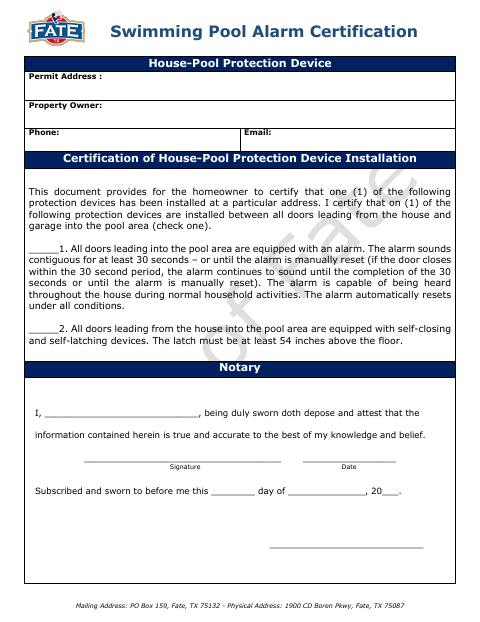
This certification lets a homeowner identify and certify a pool-protection device installed between doors leading from the house or garage into the pool area.
- licensed online notary
- ~15 min average
- Notarized PDF emailed
What you’ll need
- Government-issued photo ID
- Webcam-enabled device (laptop or phone)
- This form, ready to upload as a PDF
What this form is
The form is a homeowner certification for a house-pool protection device, with a choice between door alarms and self-closing, self-latching devices. It asks the homeowner to identify the property and certify that the selected device is installed between doors leading into the pool area. The document is titled as a pool-protection-device permit certification and includes a sworn statement, signature, date, and notary section.
Who needs it
A homeowner identifying an installed alarm or self-closing, self-latching device for the house-pool protection device permit should complete this certification.
Why it needs a notary
The form carries a subscribed-and-sworn jurat; the homeowner signs and swears that the information is true and accurate before the notary.
How to get this notarized
- 1
Download the Certification
Download the Swimming Pool Alarm Certification from the City of Fate.
- 2
Fill In the Form
Enter the property and homeowner details, then check the box for the installed pool-protection device.
- 3
Book an Online Notary
Schedule an appointment with a commissioned online notary and have the form ready.
- 4
Sign on Video
Sign and swear to the certification during the online notary session.
- 5
Submit to the City
After notarization, submit the completed certification to the City of Fate.
Preview the form
The blank PDF straight from Fate. Look it over, then upload your filled copy to start the notary session.

You’ll need ID and a webcam.
A licensed online notary will join you on video, verify your government-issued ID, witness your signature, and apply their seal. You’ll receive the notarized PDF by email when the session ends.
Frequently asked questions
- How do I complete the pool alarm certification?
- Identify the property, select the installed protection device, and complete the certification. Sign and swear to the statement before a notary, then submit the form to the city.
- Do I need to sign this form in front of a notary?
- Yes. The form includes a subscribed-and-sworn jurat, and the homeowner's statement says the information is true and accurate to the best of their knowledge and belief.
- Can I use an online notary for this certification?
- Texas has authorized remote online notarization since 2018 under Government Code Chapter 406, Subchapter C. You can book a commissioned online notary to notarize the sworn statement by video.
- Which pool-protection devices can I certify?
- The form offers two choices: alarms on all doors leading into the pool area, or self-closing and self-latching devices on doors leading from the house into the pool area. Confirm with the city if unsure.