
Tyler, TX · Smith County
Plat Vacation Declaration
This declaration records a sole owner’s decision to vacate a plat and is filed by the owner or proprietor of all lots shown on that plat.
- licensed online notary
- ~15 min average
- Notarized PDF emailed
What you’ll need
- Government-issued photo ID
- Webcam-enabled device (laptop or phone)
- This form, ready to upload as a PDF
What this form is
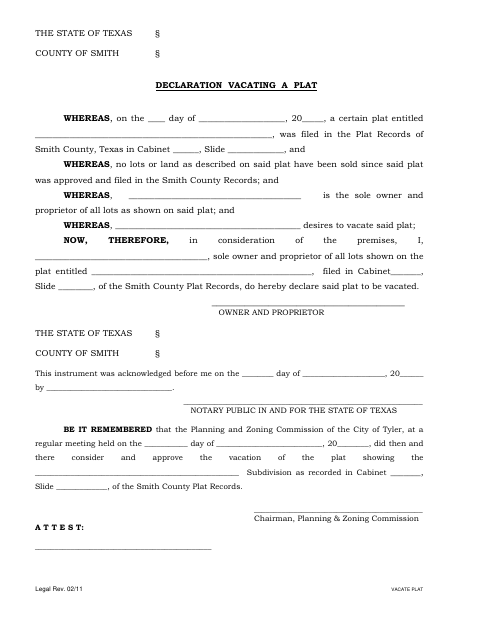
The declaration identifies the plat by its title and Smith County Plat Records details, states that no lots or land have been sold since approval and filing, and declares the plat vacated by its sole owner and proprietor. The form also includes a section for the City of Tyler Planning and Zoning Commission to record its consideration and approval of the plat vacation.
Who needs it
The sole owner and proprietor of all lots shown on a plat uses this form to declare that the plat is vacated.
Why it needs a notary
The form carries an acknowledgment block, where the owner and proprietor signs the declaration and acknowledges it before a notary.
How to get this notarized
- 1
Download the Form
Get the Plat Vacation Declaration from the City of Tyler.
- 2
Fill Out the Declaration
Enter the plat, Smith County recording details, and owner information requested on the form.
- 3
Book an Online Notary
Schedule a remote session with a commissioned online notary.
- 4
Sign on Video
Sign and acknowledge the declaration during the online notary session.
- 5
Submit to the City
Submit the completed, notarized declaration to the City of Tyler.
Preview the form
The blank PDF straight from Tyler. Look it over, then upload your filled copy to start the notary session.

You’ll need ID and a webcam.
A licensed online notary will join you on video, verify your government-issued ID, witness your signature, and apply their seal. You’ll receive the notarized PDF by email when the session ends.
Frequently asked questions
- How do I notarize a plat vacation declaration online?
- Complete the declaration, book a session with a commissioned online notary, and sign during the video session after the notary verifies your identity.
- Do I need to sign this form before a notary?
- Yes. The form includes an acknowledgment stating that the owner acknowledged the instrument before a notary.
- Can I use an online notary for this Texas form?
- Texas has authorized remote online notarization since 2018 under Government Code Chapter 406, Subchapter C. Confirm with the city if unsure whether it will accept the notarized form.