
Pine Island, TX · Waller County
Billing Contact Form
This form identifies the party financially responsible for costs associated with a Town of Pine Island planning or development application.
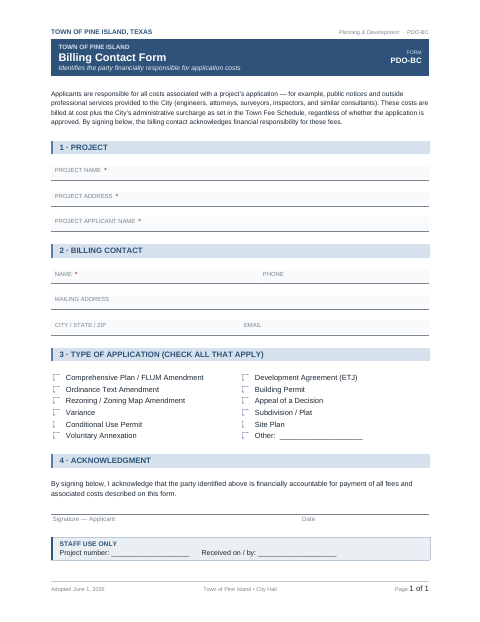
What this form is
The form identifies who will pay application-related costs, including public notices and outside professional services provided to the Town. It asks for project and applicant details, billing contact information, the application type, and a signed acknowledgment of financial responsibility. The form says these costs are billed at cost plus the Town’s administrative surcharge, whether or not the application is approved.
Who needs it
Applicants completing a Town of Pine Island application can use this form to identify the billing contact and acknowledge responsibility for associated costs.
How to submit it
Submit it to the city department named on the form; check the city website for current contact details.
About notarization
This form is signed without a notary; the applicant signs and dates the acknowledgment on the form.
How to submit this form
- 1
Download The Form
Download the Town of Pine Island Billing Contact Form.
- 2
Complete The Form
Enter the project, applicant, and billing contact details, then check the application type.
- 3
Check For Attachments
The form lists no attachments.
- 4
Sign And Submit
Sign and date the acknowledgment, then submit the form to the city department named on it.
Frequently asked questions
- What does the Billing Contact Form do?
- It identifies the party financially responsible for costs associated with an application, including public notices and outside professional services provided to the Town.
- What information does the form ask for?
- It asks for project, applicant, and billing contact details, the application type, and a signed acknowledgment of financial responsibility.
- Do I need a notary for the Billing Contact Form?
- No. The form is signed without a notary; the applicant signs and dates the acknowledgment on the form.
- How do I submit the Billing Contact Form?
- Submit it to the city department named on the form; check the city website for current contact details.
Need something notarized?
This Billing Contact Form doesn’t need a notary — but Texas residents can notarize other documents online with a commissioned online notary.