
Olney, TX · Young County
Written Plea and Fine Schedule
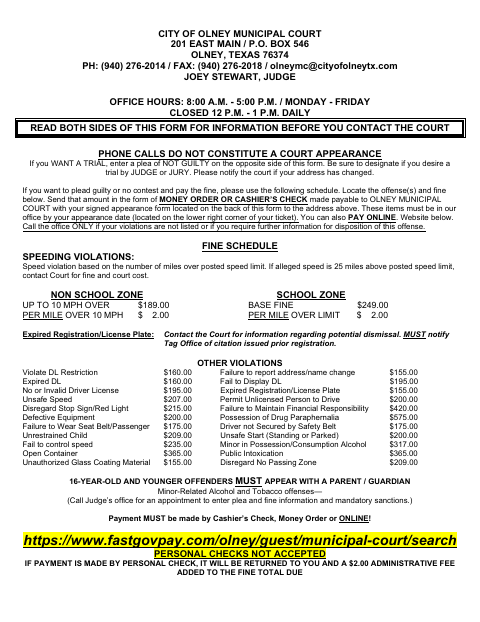
This form lets people cited by Olney Municipal Court enter a plea, request a trial, or request a driving safety course; course applicants must notarize the required sworn statement.
- licensed online notary
- ~15 min average
- Notarized PDF emailed
What you’ll need
- Government-issued photo ID
- Webcam-enabled device (laptop or phone)
- This form, ready to upload as a PDF
What this form is
Use the appearance form to enter a guilty, no-contest, or not-guilty plea, or to request a driving safety course for an eligible moving or speeding violation. The court requires the sworn statement to be signed before a Notary Public or in the Judge’s office only if you are requesting the driving safety course. Follow the form’s instructions for deadlines, supporting documents, and payment.
Who needs it
People responding to an Olney Municipal Court citation use this form to enter a plea, request a trial, or seek approval for a driving safety course.
Why it needs a notary
The driving safety course section carries a sworn statement; the defendant requesting the course signs it before a notary or in the Judge’s office.
How to get this notarized
- 1
Download the Form
Get the Written Plea and Fine Schedule from the City of Olney website.
- 2
Complete the Form
Choose a plea or complete the driving safety course request and sworn statement if applying for that option.
- 3
Book an Online Notary
Schedule a session with a commissioned online notary for the driving safety course sworn statement.
- 4
Sign on Video
Sign the sworn statement during the online notarization session as directed by the notary.
- 5
Submit to the City
Send the signed form and any required documents and payment to Olney Municipal Court by the applicable deadline.
Preview the form
The blank PDF straight from Olney. Look it over, then upload your filled copy to start the notary session.

You’ll need ID and a webcam.
A licensed online notary will join you on video, verify your government-issued ID, witness your signature, and apply their seal. You’ll receive the notarized PDF by email when the session ends.
Frequently asked questions
- How do I get the driving safety course statement notarized?
- Complete the sworn statement in the driving safety course section, then sign it before a commissioned online notary during a video session. Submit it with the other required materials by your appearance date.
- Do I need a notary for every plea on this form?
- No. The form says to sign the sworn statement before a Notary Public or in the Judge’s office only if you are taking the driving safety course. The regular plea section does not state a notary requirement.
- Can I notarize the sworn statement online?
- Texas has authorized remote online notarization since 2018 under Government Code Chapter 406, Subchapter C. Ask the court whether it accepts an online-notarized statement; confirm with the city if unsure.
- What else must I send with a driving safety course request?
- The form lists proof of liability insurance, a copy of a valid non-CDL Texas driver’s license, a Type 3A driving record, and court-cost payment. Follow its submission and deadline instructions.