
Amalga, UT · Cache County
Land Use Certificate of Approval
This certificate records the Amalga Town Planning Commission’s approval of a minor subdivision and is completed by the commission for the property owner’s parcel.
- licensed online notary
- ~15 min average
- Notarized PDF emailed
What you’ll need
- Government-issued photo ID
- Webcam-enabled device (laptop or phone)
- This form, ready to upload as a PDF
What this form is
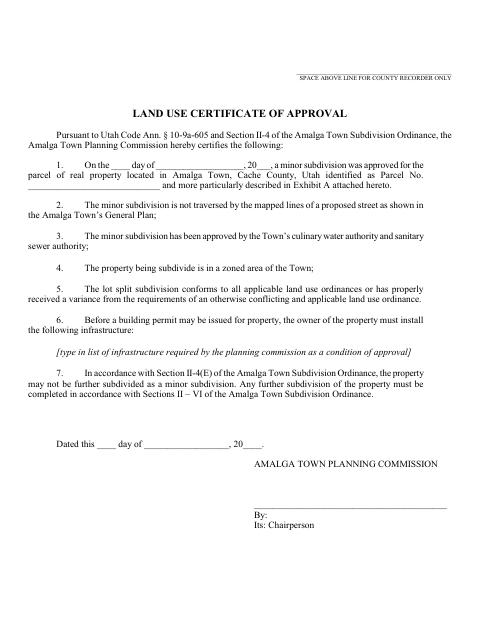
The certificate documents the Planning Commission’s approval of a minor subdivision and states conditions and findings, including required infrastructure before a building permit may be issued. It also says the property may not be further subdivided as a minor subdivision. The completed certificate includes an attached legal description in Exhibit A and is intended for recording; the form reserves space above the line for the county recorder.
Who needs it
The Amalga Town Planning Commission completes this certificate for an approved minor subdivision, with the parcel identified and its legal description attached as Exhibit A.
Why it needs a notary
The form carries a sworn statement and acknowledgment block; the Planning Commission chairperson named in the certificate appears and signs before the notary.
How to get this notarized
- 1
Download The Certificate
Get the Land Use Certificate of Approval from the town and review its approval statements and signature block.
- 2
Complete The Form
Enter the parcel and approval details, list required infrastructure if applicable, and attach the property’s legal description as Exhibit A.
- 3
Book An Online Notary
The Planning Commission chairperson named in the certificate schedules a remote online notarization session.
- 4
Sign On Video
Appear on video before the notary, take the oath, and sign and acknowledge the certificate as directed.
- 5
Submit To The City
Follow the town’s instructions for completing and submitting the certificate for recording.
Preview the form
The blank PDF straight from Amalga. Look it over, then upload your filled copy to start the notary session.

You’ll need ID and a webcam.
A licensed online notary will join you on video, verify your government-issued ID, witness your signature, and apply their seal. You’ll receive the notarized PDF by email when the session ends.
Frequently asked questions
- How do I get the Land Use Certificate of Approval notarized?
- Complete the certificate and attach the property’s legal description as Exhibit A. The Planning Commission chairperson named in the form books an online session, appears on video, and signs before the notary.
- Do I need to attach a legal description?
- Yes. The form includes Exhibit A and instructs the user to attach the legal description of the property. Confirm the attachment and recording requirements with the town before submitting the certificate.
- Can I sign this certificate with a remote online notary?
- Utah authorizes remote notarization by a commissioned online notary who meets the state’s remote-notary certification and procedure requirements. The signer must appear before the notary through the online session.
- Where do I submit the completed certificate?
- The form reserves space for the county recorder and is intended for recording. Confirm the submission process and any recording requirements with the city or county recorder if unsure.