
Layton, UT · Davis County
Property Owner Affidavit and Agent Authorization
This affidavit identifies property ownership, confirms application information, and authorizes an agent when applicable; property owners submit it with a Layton City land use application.
- licensed online notary
- ~15 min average
- Notarized PDF emailed
What you’ll need
- Government-issued photo ID
- Webcam-enabled device (laptop or phone)
- This form, ready to upload as a PDF
What this form is
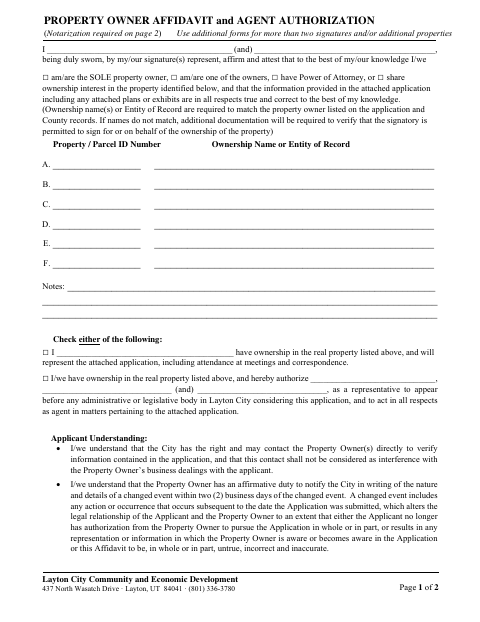
The form lets property owners affirm ownership and the accuracy of information in an attached application, plans, or exhibits. Owners can state that they will represent the application themselves or authorize an agent to act for them before Layton City bodies. The form says it is required with application documents, must be printed, manually signed, and scanned, and requires notarization on page 2.
Who needs it
Property owners submitting an application to Layton City Community and Economic Development must complete this form, including owners authorizing an agent to represent them.
Why it needs a notary
Page 2 contains acknowledgment blocks for property owners; each owner signing the affidavit must acknowledge the signature before a notary.
How to get this notarized
- 1
Download the Form
Download the Property Owner Affidavit and Agent Authorization from Layton City.
- 2
Fill Out the Form
Enter ownership and parcel details, confirm the application information, and indicate whether an agent is authorized.
- 3
Book an Online Notary
Arrange an appointment with a commissioned online notary and confirm with Layton City that remote notarization is acceptable.
- 4
Sign on Video
Follow the notary’s instructions to acknowledge the property owner signature during the online session.
- 5
Submit to the City
Follow the form’s direction to print, manually sign, scan, and include it with the other application documents.
Preview the form
The blank PDF straight from Layton. Look it over, then upload your filled copy to start the notary session.

You’ll need ID and a webcam.
A licensed online notary will join you on video, verify your government-issued ID, witness your signature, and apply their seal. You’ll receive the notarized PDF by email when the session ends.
Frequently asked questions
- How do I notarize the property owner affidavit?
- Complete the form, then sign the property owner acknowledgment before a commissioned online notary. The form also says to print, manually sign, and scan it; confirm the city’s requirements for an online notarization.
- Do I need to notarize this form?
- Yes. The form states that notarization is required on page 2 and includes acknowledgment blocks for property owner signatures.
- Can an agent represent me on the application?
- Yes. The form lets owners authorize named representatives to appear before Layton City administrative or legislative bodies and act as agents on application matters.
- Where should I submit the completed affidavit?
- The form says to include the printed, manually signed, scanned affidavit with the other application documents. Confirm the submission method and any online notarization requirements with the city or county recorder if unsure.
- Can I use remote online notarization?
- Utah authorizes a commissioned online notary to perform remote notarizations. However, this form calls for a manual signature and scanned copy, so ask Layton City whether it accepts a remotely notarized version.
Property Owner Affidavit and Agent Authorization in other Davis County cities
Each city publishes its own version of this form. Pick the city where you’re filing.