
Brian Head, UT · Iron County
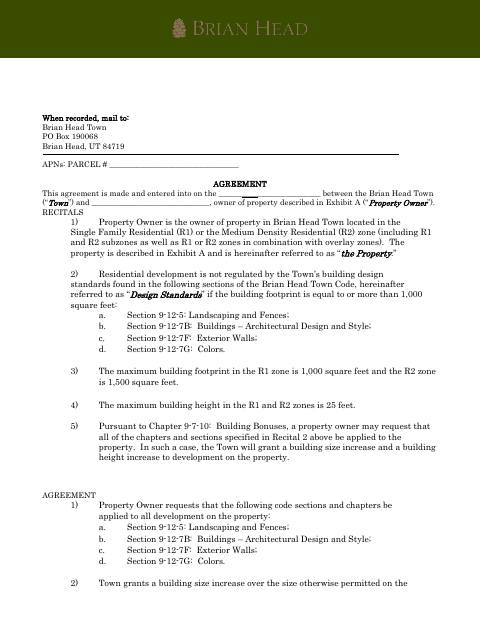
Building Bonus Agreement
This agreement lets a Brian Head property owner request increased building coverage and height in exchange for applying specified town design standards to development on the property.
- licensed online notary
- ~15 min average
- Notarized PDF emailed
What you’ll need
- Government-issued photo ID
- Webcam-enabled device (laptop or phone)
- This form, ready to upload as a PDF
What this form is
The agreement applies to property in Brian Head’s R1 or R2 zones and requests application of specified standards for landscaping, architectural design, exterior walls, and colors. In return, the Town grants increased building coverage and height, subject to the agreement’s limits. The property owner signs to accept the terms, which bind future owners and successors; the completed agreement is mailed to the Town for recording.
Who needs it
A property owner in Brian Head’s R1 or R2 zone who wants the specified design standards applied and requests the building size and height increases described in the agreement.
Why it needs a notary
The form contains a notarial acknowledgment: the property owner named in the agreement appears before the notary, presents satisfactory evidence of identity, and acknowledges signing it.
How to get this notarized
- 1
Download The Agreement
Download the Building Bonus Agreement and review its terms and Exhibit A.
- 2
Fill In The Property Details
Enter the parcel number and owner information, and ensure the property’s legal description is included in Exhibit A.
- 3
Book An Online Notary
Arrange an online notarization with a commissioned online notary.
- 4
Sign On Video
Appear on video, provide satisfactory evidence of identity, and acknowledge your signature when directed by the notary.
- 5
Submit To Brian Head Town
Mail the completed agreement to Brian Head Town at the address shown on the form for recording.
Preview the form
The blank PDF straight from Brian Head. Look it over, then upload your filled copy to start the notary session.

You’ll need ID and a webcam.
A licensed online notary will join you on video, verify your government-issued ID, witness your signature, and apply their seal. You’ll receive the notarized PDF by email when the session ends.
Frequently asked questions
- How do I complete the Building Bonus Agreement?
- Fill in the property owner and parcel details, review the agreement and Exhibit A legal description, then sign before a notary. Mail the completed agreement to Brian Head Town for recording.
- Do I need to sign this agreement before a notary?
- Yes. The form includes an acknowledgment requiring the property owner to appear before a notary, provide satisfactory evidence of identity, and acknowledge signing.
- Can I use an online notary for this form?
- Utah authorizes remote online notarization by a commissioned online notary with the required remote-notary certification. Ask the Town whether it will accept the remotely notarized agreement for recording.
- Where do I send the signed agreement?
- The form says to mail the agreement to Brian Head Town, PO Box 190068, Brian Head, UT 84719. Confirm with the city or county recorder if unsure.