
Rocky Ridge, UT · Juab County
Municipal Declaration of Candidacy
This form declares a candidate’s intention to run for a municipal office and is filed by candidates seeking a four-year term in Rocky Ridge.
- licensed online notary
- ~15 min average
- Notarized PDF emailed
What you’ll need
- Government-issued photo ID
- Webcam-enabled device (laptop or phone)
- This form, ready to upload as a PDF
What this form is
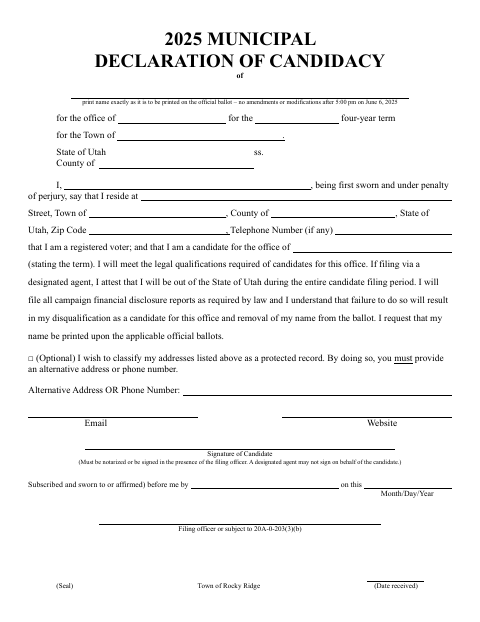
The declaration identifies the candidate, the office sought, and the four-year term, and includes statements about voter registration, qualifications, and campaign financial disclosure reports. Candidates sign it for filing with the Town of Rocky Ridge; the form says the signature must be notarized or signed in the presence of the filing officer. A designated agent may file only if the candidate will be outside Utah during the entire filing period, and may not sign for the candidate.
Who needs it
Anyone running for a four-year municipal office in Rocky Ridge must complete and file this declaration, signing it personally before a notary or filing officer.
Why it needs a notary
The form includes a subscribed-and-sworn-to-or-affirmed jurat, which the candidate signs before the notary; a designated agent may not sign for the candidate.
How to get this notarized
- 1
Download the Form
Download the Rocky Ridge Municipal Declaration of Candidacy.
- 2
Fill Out the Form
Enter your candidate information, office, term, and contact details.
- 3
Book an Online Notary
Arrange an appointment with a commissioned online notary, or plan to sign before the filing officer.
- 4
Sign on Video
If using online notarization, sign during the notary's live video session.
- 5
Submit to the Town
File the completed declaration with the Town of Rocky Ridge.
Preview the form
The blank PDF straight from Rocky Ridge. Look it over, then upload your filled copy to start the notary session.

You’ll need ID and a webcam.
A licensed online notary will join you on video, verify your government-issued ID, witness your signature, and apply their seal. You’ll receive the notarized PDF by email when the session ends.
Frequently asked questions
- How do I complete the declaration?
- Fill in your candidate, office, term, and contact details, then sign before a notary or the filing officer. Submit the completed declaration to the Town of Rocky Ridge.
- Do I need to sign this form in front of a notary?
- The form requires your signature to be notarized or signed in the presence of the filing officer. A designated agent may not sign on your behalf.
- Can I sign the declaration with an online notary?
- Utah authorizes remote online notarization by a commissioned online notary. Check that the filing officer will accept an online notarization before signing.
- Where should I submit the completed form?
- The form is for filing with the Town of Rocky Ridge. Confirm the filing process with the town; confirm with the city or county recorder if unsure.