
Millcreek, UT · Salt Lake County
Property Owner or Manager Authorization
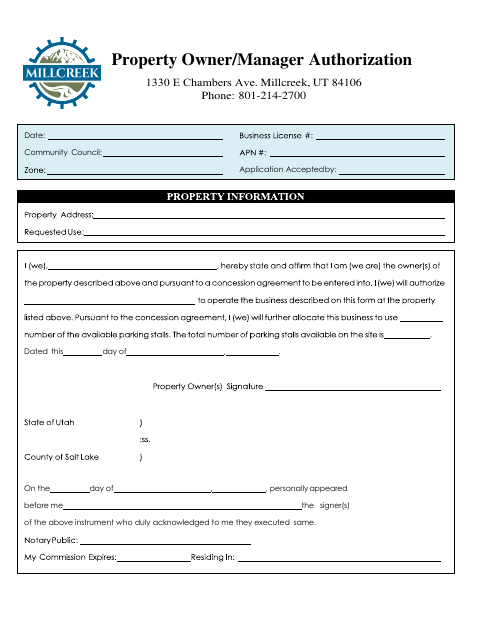
This form records a property owner or manager authorization and includes fields for the community council, application acceptance, and the signer’s notarized acknowledgment.
- licensed online notary
- ~15 min average
- Notarized PDF emailed
What you’ll need
- Government-issued photo ID
- Webcam-enabled device (laptop or phone)
- This form, ready to upload as a PDF
What this form is
The Property Owner or Manager Authorization form records an authorization and provides spaces for a community council, application acceptance, and the date. It also includes an acknowledgment for the signer or signers to complete before a notary. The form text does not specify which applications require it, so check with Millcreek about whether it applies to your submission and how to file the completed form.
Who needs it
A property owner or manager whose authorization is requested for an application associated with a community council may need to complete this form.
Why it needs a notary
The form has an acknowledgment block stating that the signer or signers personally appeared before a notary and acknowledged executing the instrument.
How to get this notarized
- 1
Download the Form
Download the Property Owner or Manager Authorization from Millcreek.
- 2
Fill In the Form
Complete the applicable authorization, community council, application acceptance, and date fields.
- 3
Book an Online Notary
Arrange a notary appointment and confirm Millcreek accepts remote notarization for this form.
- 4
Sign on Video
The signer or signers appear before the notary and acknowledge executing the form.
- 5
Submit to the City
Ask Millcreek where and how to submit the completed, notarized form.
Preview the form
The blank PDF straight from Millcreek. Look it over, then upload your filled copy to start the notary session.

You’ll need ID and a webcam.
A licensed online notary will join you on video, verify your government-issued ID, witness your signature, and apply their seal. You’ll receive the notarized PDF by email when the session ends.
Frequently asked questions
- How do I complete the Property Owner or Manager Authorization?
- Fill in the requested authorization and application details, then have the signer or signers complete the acknowledgment before a notary. Ask Millcreek how to submit the finished form.
- Do I need to sign this form before a notary?
- Yes. The form includes an acknowledgment stating that the signer or signers personally appeared before a notary and acknowledged executing the instrument.
- Can I use online notarization for this form?
- Utah authorizes remote online notarization by a notary with remote notary certification. Before proceeding, confirm that Millcreek will accept a remotely notarized acknowledgment for your submission.
- Where do I submit the completed form?
- The form text does not give submission instructions. Contact Millcreek to confirm where to file it; confirm with the city or county recorder if unsure.