
Vernal, UT · Uintah County
Application for Reimbursement of Public Improvements
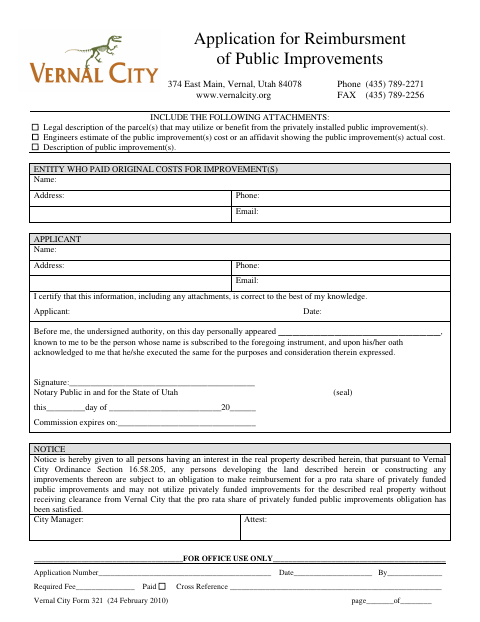
This application requests reimbursement for privately installed public improvements and is filed by the applicant seeking reimbursement, with information about the entity that paid the original costs.
- licensed online notary
- ~15 min average
- Notarized PDF emailed
What you’ll need
- Government-issued photo ID
- Webcam-enabled device (laptop or phone)
- This form, ready to upload as a PDF
What this form is
Use this application to request reimbursement for privately installed public improvements. It identifies the entity that paid the original costs and the applicant, and requires a parcel legal description, an engineer’s cost estimate or an affidavit of actual cost, and a description of the improvements. The form also gives notice that covered development or construction may require payment of a pro rata share and city clearance.
Who needs it
An applicant seeking reimbursement for privately installed public improvements should complete this form and provide the required information and attachments.
Why it needs a notary
The form carries an acknowledgment block stating the signer appeared and acknowledged the instrument upon oath; the applicant signs before the notary.
How to get this notarized
- 1
Download the Application
Get the Application for Reimbursement of Public Improvements from Vernal City.
- 2
Fill In the Form
Enter the applicant and original-cost entity details, then gather the required legal description and improvement cost and description attachments.
- 3
Book an Online Notary
Arrange an online notarization for the applicant’s signature.
- 4
Sign on Video
Sign the application during the online notary session and complete the acknowledgment.
- 5
Submit to the City
Send the completed application and attachments to Vernal City.
Preview the form
The blank PDF straight from Vernal. Look it over, then upload your filled copy to start the notary session.

You’ll need ID and a webcam.
A licensed online notary will join you on video, verify your government-issued ID, witness your signature, and apply their seal. You’ll receive the notarized PDF by email when the session ends.
Frequently asked questions
- How do I file this reimbursement application?
- Complete the applicant and original-cost entity details, attach the parcel legal description and improvement cost information, sign before a notary, and submit the application to Vernal City.
- Do I need to attach supporting documents?
- Yes. The form calls for a legal description of benefiting parcels, an engineer’s cost estimate or an affidavit of actual cost, and a description of the public improvements.
- Can I sign this form with an online notary?
- Utah permits a notary with remote-notary certification to perform remote notarizations. Confirm the city will accept your completed form before filing.
- Where do I record or submit this application?
- The form is addressed to Vernal City and includes a city notice about reimbursement obligations and clearance. Confirm with the city or county recorder if unsure.