
Heber City, UT · Wasatch County
Accessory Dwelling Unit Notice
This notice identifies a property with an accessory dwelling unit and records the owner’s agreement to follow Heber City requirements; property owners complete it for the described property.
- licensed online notary
- ~15 min average
- Notarized PDF emailed
What you’ll need
- Government-issued photo ID
- Webcam-enabled device (laptop or phone)
- This form, ready to upload as a PDF
What this form is
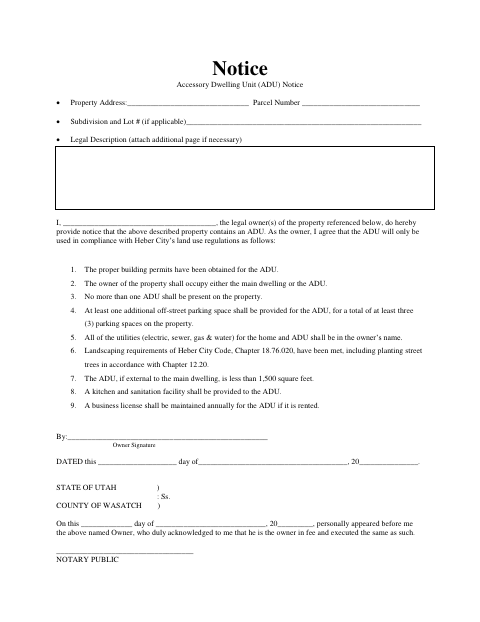
This notice identifies a property containing an accessory dwelling unit (ADU) and includes the property address, parcel number, subdivision and lot, and legal description. The owner signs to acknowledge ownership and agree to conditions covering permits, occupancy, the number of ADUs, parking, utilities, landscaping, size, kitchen and sanitation facilities, and a business license if the ADU is rented. Attach an additional page for the legal description if necessary.
Who needs it
The legal owner of a property containing an ADU completes this notice and agrees to the listed conditions for the described property.
Why it needs a notary
The form includes an acknowledgment block stating that the owner personally appeared and acknowledged ownership and execution; the property owner signs before the notary.
How to get this notarized
- 1
Download the Notice
Get the Accessory Dwelling Unit Notice from Heber City.
- 2
Fill In Property Details
Enter the property address, parcel number, subdivision and lot if applicable, and legal description. Attach an additional page for the legal description if needed.
- 3
Book an Online Notary
Schedule an appointment with a commissioned online notary.
- 4
Sign on Video
Appear by video and sign the notice before the notary completes the acknowledgment.
- 5
Submit to the City
Ask Heber City how to submit the completed notice and any required attachments.
Preview the form
The blank PDF straight from Heber City. Look it over, then upload your filled copy to start the notary session.

You’ll need ID and a webcam.
A licensed online notary will join you on video, verify your government-issued ID, witness your signature, and apply their seal. You’ll receive the notarized PDF by email when the session ends.
Frequently asked questions
- How do I notarize the ADU notice online?
- Complete the notice, book an appointment with a commissioned online notary, and sign during the video session. The notary completes the acknowledgment after verifying your identity.
- Do I need to sign the notice in front of a notary?
- Yes. The form includes an acknowledgment stating that the owner personally appeared before the notary and acknowledged ownership and execution.
- Can I use an online notary for this form?
- Utah authorizes remote online notarization by a commissioned online notary. Ask Heber City whether it accepts the remotely notarized form for your situation.
- Where should I submit the completed notice?
- The form does not state where to submit it. Contact Heber City about its submission process, and confirm with the city or county recorder if unsure.