
Hurricane, UT · Washington County
Acknowledgement, Waiver and Release
This property-owner form acknowledges geotechnical conditions and releases Hurricane City from specified liability; the owner files it in connection with a building permit for an improvement on the described property.
- licensed online notary
- ~15 min average
- Notarized PDF emailed
What you’ll need
- Government-issued photo ID
- Webcam-enabled device (laptop or phone)
- This form, ready to upload as a PDF
What this form is
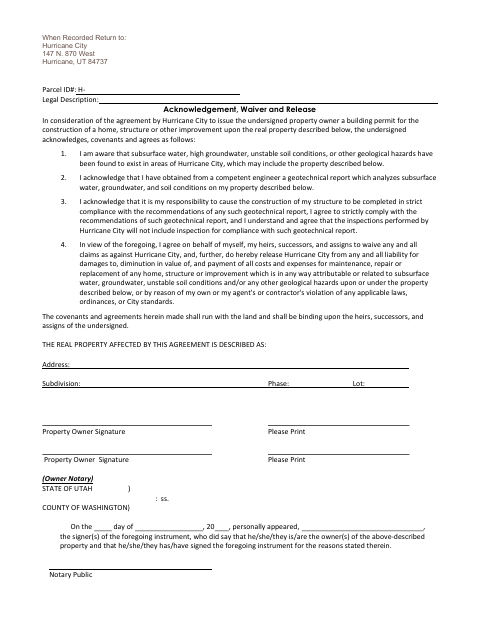
The form records the property owner's acknowledgment of potential subsurface water, groundwater, soil, or other geological hazards and of a geotechnical report for the property. The owner agrees to follow the report's recommendations and releases Hurricane City from specified claims related to hazards or violations. Hurricane City requires the signed form in consideration of issuing a building permit for a home, structure, or other improvement on the described property.
Who needs it
A property owner seeking a Hurricane City building permit for a home, structure, or other improvement on property described in the form needs to sign it.
Why it needs a notary
The form includes a state-jurat-style block stating the signer personally appeared and acknowledged signing; the property owner signs before the notary.
How to get this notarized
- 1
Download the Form
Download Hurricane City's Acknowledgement, Waiver and Release form.
- 2
Fill In Property Details
Enter the parcel ID, legal description, address, subdivision, phase, lot, and owner details requested.
- 3
Book an Online Notary
Arrange a remote appointment with a commissioned online notary and have identification ready.
- 4
Sign on Video
Wait to sign until the notary directs you during the video appointment and completes the notary block.
- 5
Submit to the City
Return the completed form as directed by Hurricane City; the form lists an address for return when recorded.
Preview the form
The blank PDF straight from Hurricane. Look it over, then upload your filled copy to start the notary session.

You’ll need ID and a webcam.
A licensed online notary will join you on video, verify your government-issued ID, witness your signature, and apply their seal. You’ll receive the notarized PDF by email when the session ends.
Frequently asked questions
- How do I complete the Hurricane waiver and release?
- Fill in the property and owner details, then sign before a notary. Return the completed form to Hurricane City as directed; it includes a “When Recorded Return to” address.
- Do I need to sign this form in front of a notary?
- Yes. The form includes a notary block stating that the signer personally appeared, so wait to sign until you are before the notary.
- Can I use an online notary for this form?
- Utah authorizes a commissioned online notary to perform remote notarizations under its remote-notary procedures. Ask Hurricane City whether it will accept the remotely notarized form before you proceed.
- Where should I return the completed form?
- The form lists Hurricane City, 147 N. 870 West, Hurricane, UT 84737, after “When Recorded Return to.” Because it is intended to be returned when recorded, confirm with the city or county recorder if unsure.