
Burlington, VT · Chittenden County
Vehicle for Hire Vehicle Certifications
This certification lets a vehicle-for-hire company owner attest that the company’s vehicles meet the listed requirements and provide supporting insurance and registration documents to Burlington.
- licensed online notary
- ~15 min average
- Notarized PDF emailed
What you’ll need
- Government-issued photo ID
- Webcam-enabled device (laptop or phone)
- This form, ready to upload as a PDF
What this form is
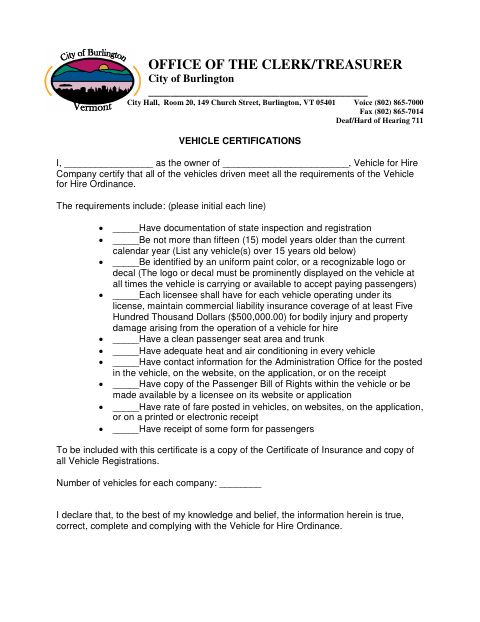
The form asks the owner to certify that each vehicle meets the listed standards, including inspection, registration, age, appearance, insurance, and passenger-related requirements. The owner also states the number of vehicles and declares the information true, correct, complete, and compliant with the Vehicle for Hire Ordinance. The form calls for a Certificate of Insurance and copies of all vehicle registrations to accompany the certification.
Who needs it
A vehicle-for-hire company owner uses this form to certify that the company’s vehicles meet the listed requirements and identify how many vehicles the company operates.
Why it needs a notary
The form carries a notary acknowledgment; the vehicle-for-hire company owner signs the certification before a notary, who completes the acknowledgment and commission-expiration line.
How to get this notarized
- 1
Download The Form
Get the Vehicle Certifications form from the City of Burlington.
- 2
Complete The Certification
Enter the owner and company information, initial the listed requirements, state the vehicle count, and gather the required insurance and registration copies.
- 3
Book An Online Notary
Arrange a session with a commissioned online notary authorized to perform remote notarizations.
- 4
Sign On Video
Sign the certification during the online notary session so the notary can complete the acknowledgment.
- 5
Submit To The City
Send the signed certification and required attachments to the City of Burlington Office of the Clerk/Treasurer.
Preview the form
The blank PDF straight from Burlington. Look it over, then upload your filled copy to start the notary session.

You’ll need ID and a webcam.
A licensed online notary will join you on video, verify your government-issued ID, witness your signature, and apply their seal. You’ll receive the notarized PDF by email when the session ends.
Frequently asked questions
- How do I complete the vehicle certification?
- The company owner completes the certification, initials the applicable vehicle requirements, lists the number of vehicles, and gathers the Certificate of Insurance and vehicle registrations. Sign before a notary, then submit it to the City of Burlington.
- Do I need to attach insurance and registration documents?
- Yes. The form says to include a copy of the Certificate of Insurance and copies of all vehicle registrations with the certification.
- Can I sign this form with an online notary?
- Remote online notarization under 26 V.S.A. § 5379 requires a commissioned notary who holds a Special Endorsement issued by the Secretary of State's Office of Professional Regulation (OPR).
- Where should I submit the completed form?
- The form is headed for the City of Burlington Office of the Clerk/Treasurer. For current submission instructions, confirm with the city clerk if unsure.