
Cheriton, VA · Northampton County
Application for Use of Town Park Facilities
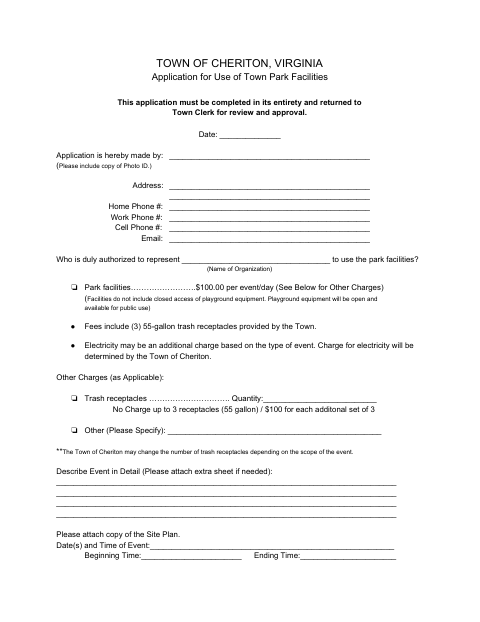
This application requests permission to use Town of Cheriton park facilities and is filed by an applicant or organization representative with the Town Clerk for review and approval.
- licensed online notary
- ~15 min average
- Notarized PDF emailed
What you’ll need
- Government-issued photo ID
- Webcam-enabled device (laptop or phone)
- This form, ready to upload as a PDF
What this form is
The application gives the Town details about the applicant, organization, event dates, attendance, activities, equipment, and requested services. The applicant submits it to the Town Clerk for review and approval before using the park; the form calls for a site plan and evidence of liability insurance, and may require permits, fees, or deposits depending on the event. Its checklist sets different submission timelines for community and private events.
Who needs it
An individual or authorized organization representative seeking to hold an event at Town of Cheriton park facilities must complete and submit this application to the Town Clerk.
Why it needs a notary
The form carries a subscribed-and-sworn jurat stating the instrument was subscribed and sworn before a notary; the applicant named in the jurat signs before the notary.
How to get this notarized
- 1
Download The Application
Get the Town of Cheriton Application for Use of Town Park Facilities.
- 2
Complete The Form
Provide applicant and event details, attach a site plan, and gather requested insurance evidence and any applicable permits.
- 3
Book An Online Notary
Arrange an online notarization for the applicant’s subscribed-and-sworn jurat.
- 4
Sign On Video
Sign the applicant section before the notary during your online video session.
- 5
Submit To The Town
Return the completed application to the Town Clerk for review and approval, with required attachments and payments.
Preview the form
The blank PDF straight from Cheriton. Look it over, then upload your filled copy to start the notary session.

You’ll need ID and a webcam.
A licensed online notary will join you on video, verify your government-issued ID, witness your signature, and apply their seal. You’ll receive the notarized PDF by email when the session ends.
Frequently asked questions
- How do I submit the Town Park Facilities application?
- Complete the application and return it to the Town Clerk for review and approval. Include the requested site plan and insurance evidence, and submit any required permits, payments, or deposits.
- Do I need to sign the application before a notary?
- Yes. The application includes a subscribed-and-sworn jurat for the applicant. Sign the applicant section before the notary and complete the oath or affirmation.
- Can I use an online notary for this application?
- Virginia is widely credited as the first U.S. state to authorize remote online notarization, effective July 1, 2012. A commissioned online notary can notarize the applicant’s jurat; confirm acceptance with the Town Clerk before signing.
- What event details and attachments does the form request?
- The form asks for event dates and times, expected attendance, activities, and other details. It requests a site plan and evidence of liability insurance; permits or licenses may also be required for some events.
- Who can answer questions about requirements for my event?
- Contact the Town Clerk about review, approval, and event requirements; confirm with the city, town, or county if unsure.