
Blackstone, VA · Nottoway County
Application for Rezoning
This application requests a change in zoning classification and is filed with the Town of Blackstone by a property owner, lessee, or authorized applicant seeking rezoning.
- licensed online notary
- ~15 min average
- Notarized PDF emailed
What you’ll need
- Government-issued photo ID
- Webcam-enabled device (laptop or phone)
- This form, ready to upload as a PDF
What this form is
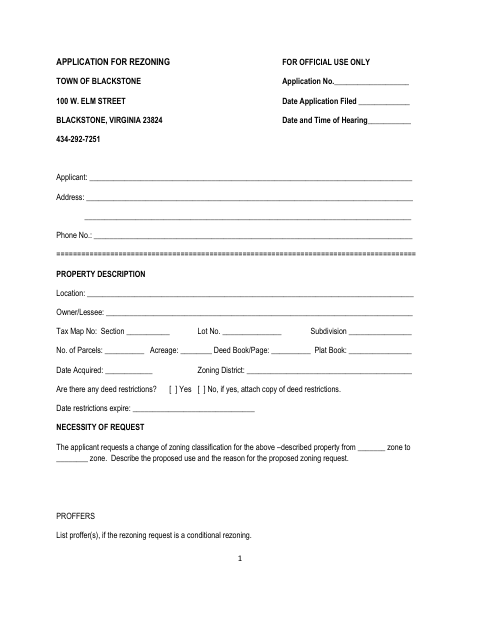
The application collects property details, the requested zoning change, proposed uses, and supporting information, including a legal description and plans where applicable. The Town’s instructions say applicants must complete the form and submit it with the required application fee; a site plan is required for cases involving an expanded existing structure or new building. The packet also includes sworn statements, ownership disclosure, and related materials.
Who needs it
A property owner, lessee, or authorized applicant seeking a zoning change for property in Blackstone must complete and submit this application.
Why it needs a notary
The form includes sworn jurats for the application, validity statement, ownership disclosure, inspection permission, and proffer; each named signer must swear or affirm before a notary.
How to get this notarized
- 1
Download the Application
Get the Town of Blackstone rezoning application and review its filing instructions and required supporting materials.
- 2
Complete the Form
Fill in the property, request, and ownership details, and prepare the legal description and other required attachments.
- 3
Book an Online Notary
Schedule a remote session with a commissioned online notary for the form’s sworn sections.
- 4
Sign on Video
Show your identification and sign the applicable statements when directed during the online notary session.
- 5
Submit to the Town
File the completed application, fee, and supporting materials with the Town of Blackstone as instructed.
Preview the form
The blank PDF straight from Blackstone. Look it over, then upload your filled copy to start the notary session.

You’ll need ID and a webcam.
A licensed online notary will join you on video, verify your government-issued ID, witness your signature, and apply their seal. You’ll receive the notarized PDF by email when the session ends.
Frequently asked questions
- How do I prepare the rezoning application for notarization?
- Complete the application and related statements, but wait to sign the sworn sections until your notary session. The packet asks for property information and supporting materials, including a legal description.
- Do I need to sign this form in front of a notary?
- Yes. The instructions say the application may be signed in front of a Notary Public, and the packet includes several statements with sworn-to or subscribed-and-sworn jurats.
- Can I complete the notarization online?
- Virginia authorized remote online notarization effective July 1, 2012. A commissioned online notary can notarize eligible documents by video; Virginia recognizes qualifying notarial acts performed in another state.
- What should I submit with the application?
- The form calls for a legal description and application fee. It also requires a site plan for cases involving expansion of an existing structure or construction of a new building; photographs are suggested.
- Who can sign the application?
- The instructions allow an agent, attorney, lessee, owner, or owners to sign the application. The sworn statements identify the signer as the lessee or owner, with supporting authority required in some circumstances; confirm with the city, town, or county if unsure.
Other forms in Blackstone
Application for Rezoning in other Virginia cities
Each city publishes its own version of this form. Pick the city where you’re filing.