
Burkeville, VA · Nottoway County
Seller’s Worksheet for Reporting Meals Tax
Burkeville sellers use this worksheet to report monthly meals sales and calculate the meals tax due to the town.
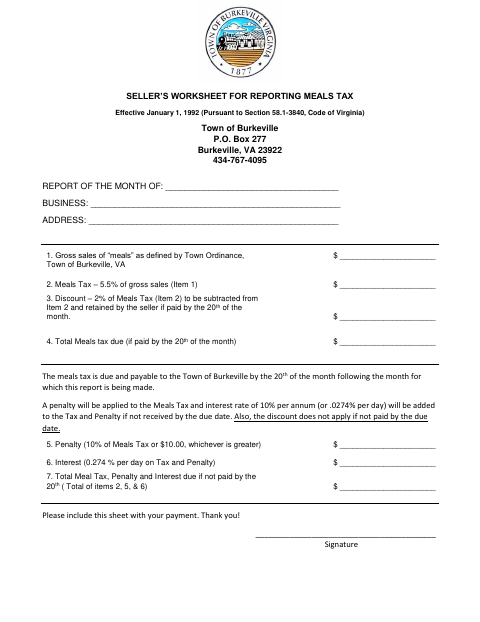
What this form is
This worksheet reports a business’s gross meals sales for a month and calculates the meals tax, any applicable discount, and amounts due if payment is late. The town says the tax is due by the 20th of the month following the reported month. The seller completes the business and sales details, enters the calculations, signs the worksheet, and includes it with payment.
Who needs it
Businesses that sell meals in Burkeville use this worksheet to report their monthly gross sales and meals tax to the town.
How to submit it
Include the completed worksheet with your payment and mail it to Town of Burkeville, P.O. Box 277, Burkeville, VA 23922.
About notarization
This document is signed without a notary; it lists no notarized attachment or sworn step, so the seller just signs and dates it.
How to submit this form
- 1
Download The Worksheet
Download the Seller’s Worksheet for Reporting Meals Tax.
- 2
Complete The Worksheet
Enter the reporting month, business details, gross meals sales, tax calculations, and seller signature.
- 3
Prepare Your Payment
The worksheet says to include it with your payment.
- 4
Mail It To The Town
Mail the completed worksheet with payment to Town of Burkeville, P.O. Box 277, Burkeville, VA 23922.
Frequently asked questions
- Do I need a notary for the Seller’s Worksheet for Reporting Meals Tax?
- No. This worksheet is signed without a notary; it lists no notarized attachment or sworn step, so the seller just signs and dates it.
- How do I submit the meals tax worksheet?
- Include the completed worksheet with your payment and mail it to the Town of Burkeville, P.O. Box 277, Burkeville, VA 23922.
- What information does the worksheet request?
- It asks for the reporting month, business name and address, gross meals sales, meals tax calculations, any applicable discount, and the seller’s signature.
- When does the town say the meals tax is due?
- The worksheet says the meals tax is due by the 20th of the month following the month being reported.