
Salem, VA · City of Salem
Business Information Release Form
Taxpayers or their authorized representatives use this form to request the release of private information associated with a business account.
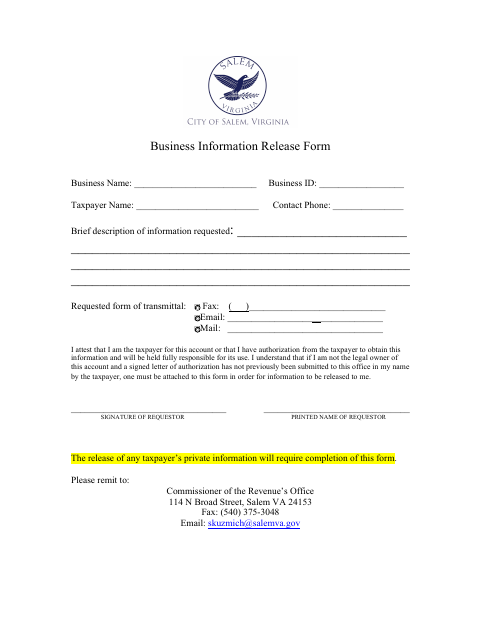
What this form is
The form lets a taxpayer or authorized representative request private information for a business account from the Commissioner of the Revenue’s Office. The requestor identifies the business and taxpayer, describes the information requested, chooses how to receive it, and attests to their authority. A non-owner must attach a signed authorization letter unless one has already been submitted to the office.
Who needs it
A taxpayer or someone authorized by the taxpayer needs this form to request private information for a business account.
How to submit it
Remit the completed form to the Commissioner of the Revenue’s Office, 114 N Broad Street, Salem VA 24153. It may also be sent by fax to (540) 375-3048 or email to [email protected].
About notarization
This form is signed without a notary; a non-owner must attach a signed taxpayer authorization letter unless one is already on file.
How to submit this form
- 1
Download the Form
Download the Business Information Release Form.
- 2
Complete the Request
Enter the business and taxpayer details, describe the information requested, choose a transmittal method, and sign.
- 3
Gather Authorization
If you are not the legal account owner and authorization is not already on file, attach a signed taxpayer authorization letter.
- 4
Submit to the City
Remit the form to the Commissioner of the Revenue’s Office by mail, fax, or email.
Frequently asked questions
- What is the Business Information Release Form for?
- It is used to request private information associated with a business account from the Commissioner of the Revenue’s Office.
- Who can request business account information?
- The taxpayer or someone authorized by the taxpayer may request information. A requestor who is not the legal account owner may need to attach a signed authorization letter.
- Do I need a notary for the Business Information Release Form?
- No. The form is signed without a notary. If you are not the legal account owner and authorization is not already on file, attach a signed taxpayer authorization letter.
- How do I submit the Business Information Release Form?
- Send it to the Commissioner of the Revenue’s Office at 114 N Broad Street, Salem VA 24153, fax it to (540) 375-3048, or email it to [email protected].
Need something notarized?
This Business Information Release Form doesn’t need a notary — but if you have another Salem form that does, a commissioned online notary can help.