
Ephrata, WA · Grant County
Claim for Damages
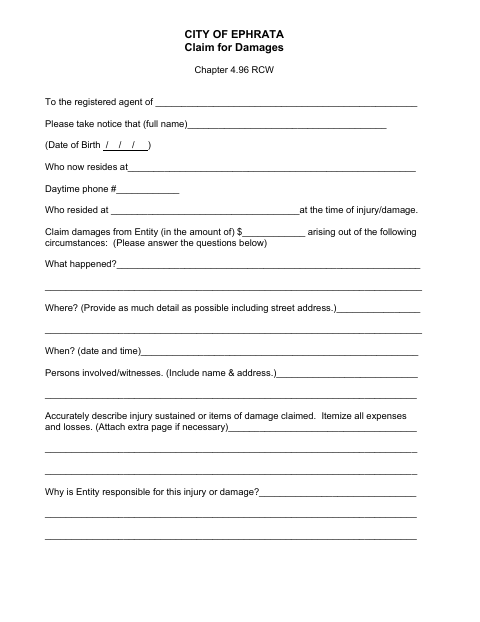
The City of Ephrata Claim for Damages form records a claimant’s account of an injury or loss and is submitted to the City’s registered agent for a claim against the City.
- licensed online notary
- ~15 min average
- Notarized PDF emailed
What you’ll need
- Government-issued photo ID
- Webcam-enabled device (laptop or phone)
- This form, ready to upload as a PDF
What this form is
Use this form to explain what happened, identify where and when it occurred, describe injuries or property damage, itemize losses, and state why the City is responsible. Ephrata’s instructions require the form to be completed clearly, supported with available documents, signed by an authorized party, and notarized. Present the completed claim to the City’s registered agent by personal delivery, registered mail, or certified mail with return receipt.
Who needs it
A person claiming damages from the City of Ephrata, or a representative authorized to sign for the claimant, must complete and submit this form.
Why it needs a notary
The form has a sworn statement and a subscribed-and-sworn jurat; the claimant or authorized representative signs the claim and takes the oath before the notary.
How to get this notarized
- 1
Download the Form
Get the City of Ephrata Claim for Damages form and its instructions.
- 2
Complete the Claim
Type or print clearly, answer the questions, and attach supporting documents or extra pages as needed.
- 3
Book an Online Notary
Arrange a remote notarization with a commissioned online notary.
- 4
Sign on Video
Sign and take the required oath before the notary during your online session.
- 5
Submit to the City
Deliver the completed form to the registered agent in person, by registered mail, or by certified mail with return receipt.
Preview the form
The blank PDF straight from Ephrata. Look it over, then upload your filled copy to start the notary session.

You’ll need ID and a webcam.
A licensed online notary will join you on video, verify your government-issued ID, witness your signature, and apply their seal. You’ll receive the notarized PDF by email when the session ends.
Frequently asked questions
- How do I submit the Ephrata Claim for Damages form?
- Complete and notarize the form, then present it to the registered agent in person or send it by registered mail or certified mail with return receipt.
- Do I need to sign the claim in front of a notary?
- Yes. Ephrata’s instructions say to have the claim notarized. The form includes a sworn statement and a jurat for the claimant or authorized representative.
- Can I use an online notary for this form?
- Washington authorizes remote online notarization by its notaries under RCW 42.45.280. Ask the City whether it will accept a remotely notarized claim; confirm with the city or town if unsure.
- What information should I include with my claim?
- Describe what happened, where and when it occurred, the people involved, the injury or damage, your expenses and losses, and why you believe the City is responsible. Attach supporting documents if available.