
Coupeville, WA · Island County
Short-Term Rental Application
This application is for property owners or their agents seeking a new or renewed Coupeville short-term rental license, with supporting documents required by the Town.
- licensed online notary
- ~15 min average
- Notarized PDF emailed
What you’ll need
- Government-issued photo ID
- Webcam-enabled device (laptop or phone)
- This form, ready to upload as a PDF
What this form is
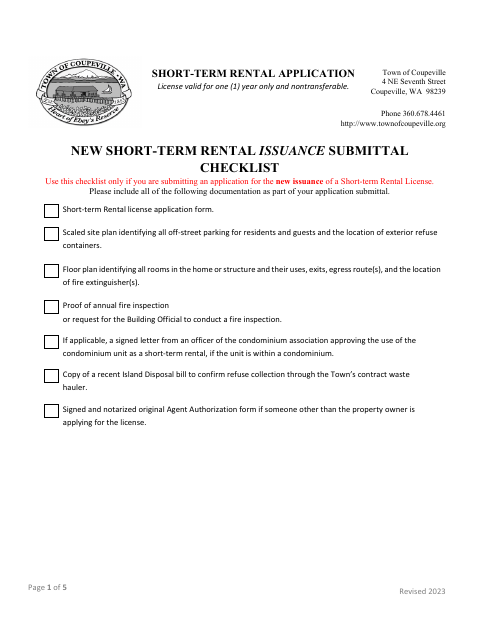
Use this form to apply for a new or renewed annual, nontransferable Coupeville short-term rental license. It collects property, owner, operator, guest-room, parking, and contact details, and includes declarations about compliance and the information submitted. The application checklists identify supporting materials, including inspection proof and property plans when applicable. If someone other than the owner applies, the form calls for a separate Agent Authorization form with owner signatures and notarization.
Who needs it
Property owners applying for or renewing a Coupeville short-term rental license need this application; an agent may submit it for the owner with a notarized Agent Authorization form.
Why it needs a notary
The Agent Authorization form carries an acknowledgment block, which the property owner or owners sign before a notary when authorizing an agent to apply.
How to get this notarized
- 1
Download the Application
Get the Town of Coupeville Short-Term Rental Application and review the new issuance or renewal checklist.
- 2
Complete the Form
Enter the owner, operator, property, guest-room, parking, and contact details, and gather the applicable supporting documents.
- 3
Prepare Agent Authorization
If an agent is applying, complete the separate Agent Authorization form for the property owner or owners to sign before a notary.
- 4
Book an Online Notary
Schedule a remote online notarization for the owner or owners signing the Agent Authorization form.
- 5
Sign on Video
Meet with the commissioned online notary by video and sign the authorization as directed.
- 6
Submit to the Town
Include the application, notarized original Agent Authorization when required, and applicable supporting documents in your Town submittal.
Preview the form
The blank PDF straight from Coupeville. Look it over, then upload your filled copy to start the notary session.

You’ll need ID and a webcam.
A licensed online notary will join you on video, verify your government-issued ID, witness your signature, and apply their seal. You’ll receive the notarized PDF by email when the session ends.
Frequently asked questions
- How do I get the Agent Authorization form notarized?
- Complete the authorization details, then have the property owner or owners sign the form before a commissioned online notary. Include the notarized original with the application when an agent applies.
- Do I need to notarize the entire application?
- The form identifies the separate Agent Authorization form as requiring notarization when someone other than the property owner applies. The application itself includes operator and owner signature lines but no notary block.
- Can I sign the Agent Authorization form online?
- Washington authorizes its notaries to perform remote online notarizations under RCW 42.45.280. A notarial act performed in another state by an authorized officer has the same effect under RCW 42.45.090; confirm with the city or town if unsure.
- What documents should I submit with a new application?
- The checklist requests the application, a scaled site plan, a floor plan, fire inspection proof or a request for inspection, and a recent Island Disposal bill. A condominium approval letter is required if applicable.