
Puyallup, WA · Pierce County
Civil Construction Application
The Civil Construction Application is for owners or applicants seeking city approval for grading, public right-of-way improvements, or new commercial utility connections.
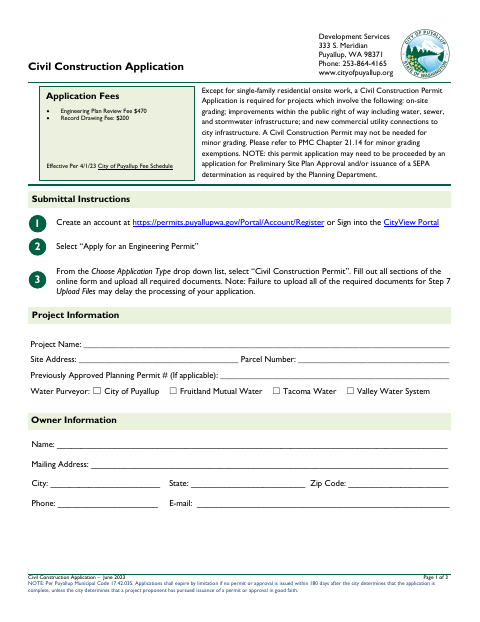
What this form is
Puyallup requires this application for projects involving on-site grading, improvements in the public right of way, or new commercial utility connections to city infrastructure, with exceptions noted for some residential work and minor grading. It collects project, owner, applicant, engineer or architect, and contractor details, and includes checklists for supporting documents and civil plan sheets. Planning approvals or a SEPA determination may be needed first.
Who needs it
Applicants for covered civil construction projects, including grading, public right-of-way improvements, and new commercial utility connections, should submit this application.
How to submit it
Create an account or sign in to the CityView Portal, choose “Apply for an Engineering Permit,” and select “Civil Construction Permit.” Complete the online form and upload required documents; listed fees are $470 for engineering plan review and $200 for record drawings.
About notarization
This application is signed and dated without a notary; it lists no notarized or sworn attachment, so the applicant just signs and dates it.
How to submit this form
- 1
Download The Application
Download the Civil Construction Application PDF and review its project requirements and document checklists.
- 2
Complete The Application
Enter project, owner, applicant, engineer or architect, and contractor information in the CityView Portal.
- 3
Gather Required Documents
Prepare applicable supporting reports and the civil plan sheets listed in the application checklist.
- 4
Submit To The City
In the portal, select “Civil Construction Permit,” complete the online form, and upload all required documents.
Frequently asked questions
- Who should file the Civil Construction Application?
- Applicants for projects involving on-site grading, improvements within the public right of way, or new commercial utility connections to city infrastructure should use this application.
- How do I submit the Civil Construction Application?
- Use the CityView Portal: sign in or create an account, select “Apply for an Engineering Permit,” choose “Civil Construction Permit,” complete the online form, and upload required documents.
- What supporting documents may be required?
- The checklist includes a stormwater site plan report and civil plan sheets. Geotechnical, critical area, and preliminary flood elevation reports are listed when applicable.
- Do I need a notary for the Civil Construction Application?
- No. The application is signed and dated without a notary; it lists no notarized or sworn attachment, so the applicant just signs and dates it.
Need something notarized?
This Civil Construction Application doesn’t need a notary — but if you have another Puyallup form that does, a commissioned online notary can help.