
Puyallup, WA · Pierce County
Shoreline Conditional Use Permit
This application is for property owners or agents seeking city review of a proposed conditional use in a Puyallup shoreline area.
What this form is
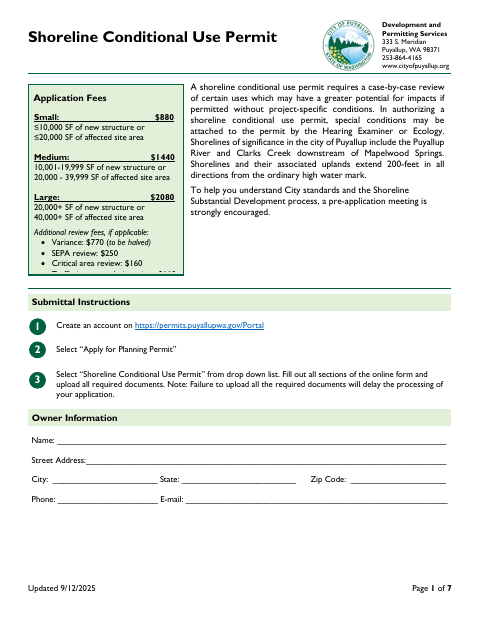
Use this application to request case-by-case review of a proposed shoreline use that may have greater potential for impacts without project-specific conditions. The form asks for owner, applicant, and site details; information about the proposal and nearby critical areas; and supporting plans and reports. It includes a checklist of required submittal materials, and the Hearing Examiner or Ecology may attach special permit conditions.
Who needs it
Property owners or authorized agents proposing a conditional use in a Puyallup shoreline area should complete this application.
How to submit it
Create an account at permits.puyallupwa.gov/Portal, select “Apply for Planning Permit,” then choose “Shoreline Conditional Use Permit.” Complete the online form and upload all required documents; the application lists fees based on project size.
About notarization
This application is signed and dated without a notary; the form does not identify any attachment or related step that must be notarized or sworn.
How to submit this form
- 1
Download The Application
Download the Shoreline Conditional Use Permit application PDF.
- 2
Complete The Application
Provide owner, applicant, site, proposal, and critical-area information, then sign and date the certification.
- 3
Gather Required Documents
Use the submittal checklist to gather the required maps, plans, reports, and applicable checklists.
- 4
Submit Through The City Portal
Create an account at permits.puyallupwa.gov/Portal, select “Apply for Planning Permit,” choose this permit, and upload the completed form and required documents.
Frequently asked questions
- Do I need a notary for the Shoreline Conditional Use Permit application?
- No. This application is signed and dated without a notary. The form does not identify any attachment or related step that must be notarized or sworn.
- How do I submit the Shoreline Conditional Use Permit application?
- Create an account at the city’s permit portal, select “Apply for Planning Permit,” choose “Shoreline Conditional Use Permit,” complete the online form, and upload all required documents.
- What information does the application ask for?
- It asks for owner, applicant, and site information, details about the proposed use, and information about critical areas. The form also requests supporting plans, reports, and other checklist items.
- What supporting documents may be required?
- The checklist includes a vicinity map, detailed site plan, stormwater information, and traffic scoping worksheet. Depending on the proposal, it may also call for a critical area report, environmental checklist, or SEPA checklist.
Need something notarized?
This Shoreline Conditional Use Permit doesn’t need a notary — but if you have another Puyallup form that does, a commissioned online notary can help.