
Puyallup, WA · Pierce County
Utility Service Connection Application
Property owners and contractors use this application to request a permit for a new connection to Puyallup’s sanitary sewer or water system.
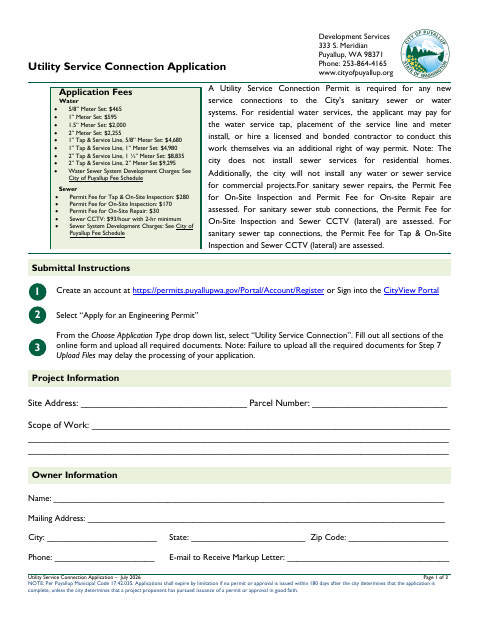
What this form is
Puyallup requires a Utility Service Connection Permit for new connections to its sanitary sewer or water systems. The application asks for site, owner, contractor, and project details, including connection type, pipe information, and meter size. Applicants must upload applicable documents, which may include a site plan, traffic control plan, or plumbing fixture worksheet.
Who needs it
Property owners or contractors proposing a new connection to Puyallup’s sanitary sewer or water system need this application.
How to submit it
Create an account or sign in to the CityView Portal, select “Apply for an Engineering Permit,” then choose “Utility Service Connection.” Complete the online form and upload all required documents.
About notarization
This application is signed without a notary; the applicant certifies under penalty of perjury and signs and dates the form.
How to submit this form
- 1
Download the Application
Download the Utility Service Connection Application PDF.
- 2
Complete the Online Form
In the CityView Portal, select “Apply for an Engineering Permit” and choose “Utility Service Connection.” Fill out all sections.
- 3
Gather Required Documents
Prepare applicable documents, such as a site plan, traffic control plan for proposed right-of-way work, or plumbing fixture worksheet when required.
- 4
Submit to the City
Upload the completed application and all required documents through the CityView Portal.
Frequently asked questions
- Do I need a notary for the Utility Service Connection Application?
- No. The application is signed without a notary. The applicant certifies under penalty of perjury and signs and dates the form.
- Who uses this application?
- Property owners or contractors proposing a new connection to Puyallup’s sanitary sewer or water system use this application to request a Utility Service Connection Permit.
- How do I submit the Utility Service Connection Application?
- Create an account or sign in to the CityView Portal, select “Apply for an Engineering Permit,” choose “Utility Service Connection,” complete the online form, and upload all required documents.
Need something notarized?
This Utility Service Connection Application doesn’t need a notary — but if you have another Puyallup form that does, a commissioned online notary can help.