
Bridgeport, WV · Harrison County
Candidate's Declaration of Inability to Pay Filing Fee
This two-page oath lets a candidate who cannot afford a filing fee declare their financial circumstances and plan to collect voter signatures instead.
- licensed online notary
- ~15 min average
- Notarized PDF emailed
What you’ll need
- Government-issued photo ID
- Webcam-enabled device (laptop or phone)
- This form, ready to upload as a PDF
What this form is
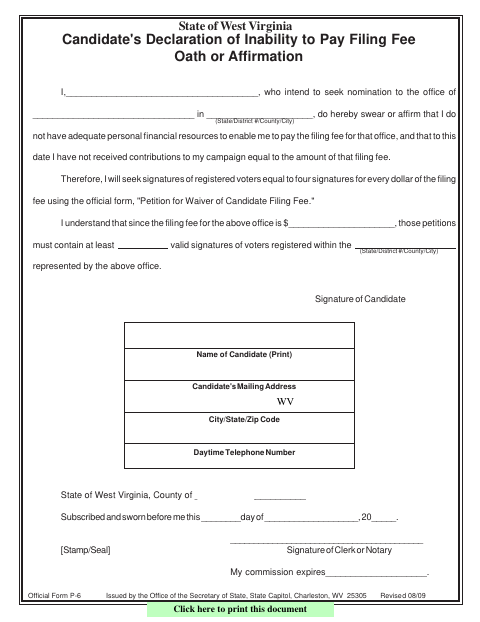
The declaration states that the candidate lacks adequate personal resources to pay the filing fee and has not received campaign contributions equal to that fee. It also records the fee amount and the candidate's plan to gather the required voter signatures using the official petition form. The instructions say to file the oath during the candidate filing period with the office designated for the office sought; municipal candidates file with the city clerk or recorder.
Who needs it
A candidate seeking to avoid a filing fee by collecting voter signatures must complete this oath and file it with the office designated for the office sought.
Why it needs a notary
The form includes a subscribed-and-sworn jurat; the candidate signs the declaration and swears or affirms it before the clerk or notary.
How to get this notarized
- 1
Download the Form
Get the Candidate's Declaration of Inability to Pay Filing Fee Oath or Affirmation.
- 2
Complete the Declaration
Enter your name, intended office, filing-fee amount, and contact information. Read the oath carefully.
- 3
Book an Online Notary
Arrange a session with a commissioned online notary who can perform the required remote notarial act.
- 4
Sign on Video
Sign and swear or affirm the declaration during the notarial session.
- 5
Submit to the Proper Office
File the oath during the candidate filing period with the office designated for your office; municipal candidates file with the city clerk or recorder.
Preview the form
The blank PDF straight from Bridgeport. Look it over, then upload your filled copy to start the notary session.

You’ll need ID and a webcam.
A licensed online notary will join you on video, verify your government-issued ID, witness your signature, and apply their seal. You’ll receive the notarized PDF by email when the session ends.
Frequently asked questions
- How do I file this candidate filing fee waiver oath?
- Sign the oath before a clerk or notary, then file it during the candidate filing period with the office designated for the office sought. Municipal candidates file with the city clerk or recorder.
- Do I need to sign this form in front of a notary?
- Yes. The form says it must be subscribed and sworn before a clerk or notary, so sign and swear or affirm the declaration in that person's presence.
- Can I use an online notary for this oath?
- West Virginia law authorizes remote online and remote ink notarization by eligible notaries under W. Va. Code §§39-4-37 and 39-4-38; an online notary must separately register with the Secretary of State for remote acts. A qualifying act by an authorized notary from another state has the same effect under §39-4-11.
- Where do I file the oath if I am running for municipal office?
- The instructions say candidates whose names will appear only in a municipal election file with the city clerk or recorder. Confirm with the city or county clerk if unsure.