
Benwood, WV · Marshall County
Financial Affidavit Payment Plan Application
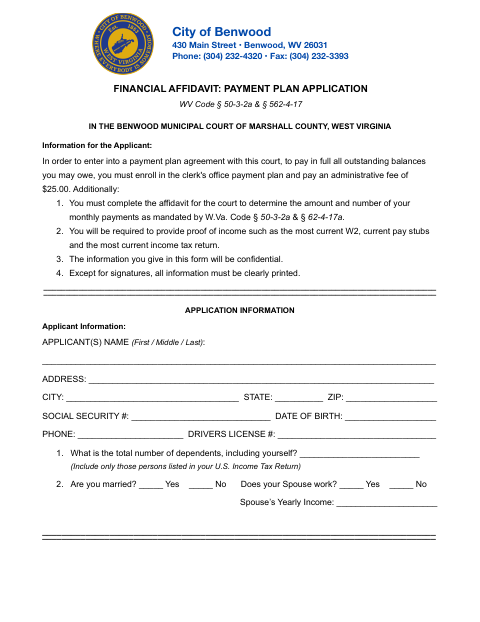
This financial affidavit payment plan application collects an applicant’s income, expenses, assets, and household details for Benwood Municipal Court to determine monthly payments toward outstanding balances.
- licensed online notary
- ~15 min average
- Notarized PDF emailed
What you’ll need
- Government-issued photo ID
- Webcam-enabled device (laptop or phone)
- This form, ready to upload as a PDF
What this form is
Benwood Municipal Court requires this affidavit from applicants seeking a payment plan to pay outstanding court balances. Applicants provide personal and household information, monthly income, expenses, assets, and supporting proof of income, such as a current W-2, pay stubs, and income tax return. The court uses the information to determine the amount and number of monthly payments; the form says the information will be confidential.
Who needs it
Anyone applying to Benwood Municipal Court for a payment plan to pay outstanding balances must complete the affidavit and provide proof of income.
How to get this notarized
- 1
Download the Affidavit
Get the Financial Affidavit Payment Plan Application from the City of Benwood.
- 2
Complete the Form
Print your information clearly, complete the income, expense, and asset sections, and gather proof of income.
- 3
- 4
Sign on Video
Sign the affidavit during the notarial session and swear or affirm that the information is complete and truthful.
- 5
Submit to the City
Remit the completed form and payment to Benwood City Hall as directed on the form.
Preview the form
The blank PDF straight from Benwood. Look it over, then upload your filled copy to start the notary session.

You’ll need ID and a webcam.
A licensed online notary will join you on video, verify your government-issued ID, witness your signature, and apply their seal. You’ll receive the notarized PDF by email when the session ends.
Frequently asked questions
- How do I submit the completed payment plan affidavit?
- The form instructs applicants to remit the completed affidavit and payment to Benwood City Hall. It also directs applicants to benwoodwv.gov/payments to make a payment.
- Do I need to sign the affidavit before a notary?
- Yes. The form says the applicant’s signature must be subscribed and sworn or affirmed before a notary. Bring the completed form to your appointment, but sign in the notary’s presence.
- Can I use a commissioned online notary for this affidavit?
- West Virginia permits remote online and remote ink notarization by its notaries, who must register with the Secretary of State for those acts. A notarial act by an authorized officer of another state has the same effect under W. Va. Code §39-4-11.
- What if I am unsure where to send the form?
- The form directs applicants to Benwood City Hall. If you are unsure about submission details, confirm with the city or county clerk if unsure.