
Kimball, WV · McDowell County
Business & Occupation Privilege Tax Return
This two-page return reports a business’s gross receipts and tax due to the Town of Kimball, and its taxpayer or authorized officer completes the required sworn verification.
- licensed online notary
- ~15 min average
- Notarized PDF emailed
What you’ll need
- Government-issued photo ID
- Webcam-enabled device (laptop or phone)
- This form, ready to upload as a PDF
What this form is
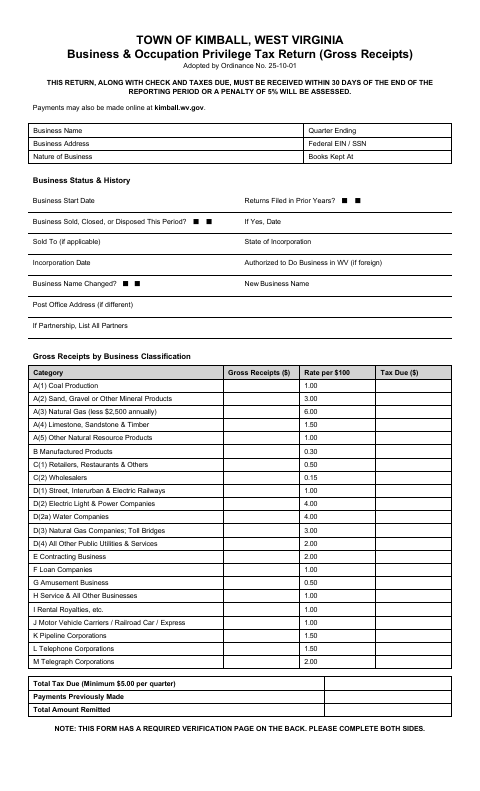
Businesses use this return to report gross receipts by business classification, calculate tax due, and provide business and ownership information. The form says the return, check, and taxes due must be received within 30 days after the reporting period ends or a 5% penalty will be assessed. Complete both sides, including the required verification by oath or affirmation, and submit the return and payment to the town; online payment is also available.
Who needs it
A business reporting gross receipts to the Town of Kimball must complete this return and provide the required verification for its reporting period.
Why it needs a notary
The form has a sworn verification stating the return is true and correct; the taxpayer or authorized officer signs before a notary public.
How to get this notarized
- 1
Download the Return
Get the Town of Kimball Business & Occupation Privilege Tax Return and review both pages.
- 2
Fill In the Return
Enter business information and gross receipts by classification, then calculate the tax due.
- 3
Book an Online Notary
Arrange an online notarization for the required verification by oath or affirmation.
- 4
Sign on Video
The taxpayer or authorized officer signs the verification during the online notary session.
- 5
Submit to the Town
Send both completed pages with the check and taxes due as directed by the Town of Kimball.
Preview the form
The blank PDF straight from Kimball. Look it over, then upload your filled copy to start the notary session.

You’ll need ID and a webcam.
A licensed online notary will join you on video, verify your government-issued ID, witness your signature, and apply their seal. You’ll receive the notarized PDF by email when the session ends.
Frequently asked questions
- How do I complete the Kimball business tax return?
- Fill in the business details and gross receipts by classification, calculate the tax due, and complete both sides, including the sworn verification. Submit the return and payment as directed by the town.
- Do I need to sign the verification before a notary?
- Yes. The return includes a verification by oath or affirmation, with a notary block. The taxpayer or authorized officer signs before the notary.
- Can I use an online notary for the verification?
- West Virginia law authorizes remote online notarization by a notary registered for that service. A notarial act performed by a notary or other authorized officer of another state has the same effect under W. Va. Code §39-4-11.
- When is this return due?
- The form says the return, check, and taxes due must be received within 30 days after the reporting period ends; otherwise, a 5% penalty will be assessed. Confirm with the city or county clerk if unsure.