
Buckhannon, WV · Upshur County
Vacant Building Registration Form
The Vacant Building Registration Form records property, utility, and owner information for individuals or entities registering or renewing a vacant building in Buckhannon.
- licensed online notary
- ~15 min average
- Notarized PDF emailed
What you’ll need
- Government-issued photo ID
- Webcam-enabled device (laptop or phone)
- This form, ready to upload as a PDF
What this form is
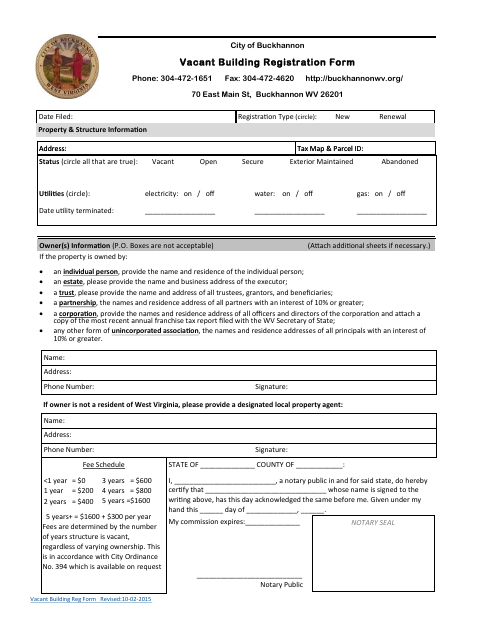
This one-page form records the property address, tax map and parcel ID, building status, utility information, owner details, and the applicable fee. Use it for a new registration or renewal of a vacant building in Buckhannon; the form says fees depend on how long the structure has been vacant, regardless of ownership changes. Nonresident owners are asked to provide a designated local property agent.
Who needs it
Owners registering or renewing a vacant building in Buckhannon need this form; nonresident owners are asked to name a designated local property agent.
Why it needs a notary
The form carries an acknowledgment certificate; the owner or designated local property agent whose signature appears on the form signs before the notary.
How to get this notarized
- 1
Download the Form
Get the Vacant Building Registration Form from the City of Buckhannon.
- 2
Fill In the Details
Complete the property, utility, owner, and agent information that applies to your registration or renewal.
- 3
Book an Online Notary
Arrange an online notarization for the form’s acknowledgment certificate.
- 4
Sign on Video
Sign the form during the online notary session, following the notary’s instructions.
- 5
Submit to the City
Send the completed form to the City of Buckhannon.
Preview the form
The blank PDF straight from Buckhannon. Look it over, then upload your filled copy to start the notary session.

You’ll need ID and a webcam.
A licensed online notary will join you on video, verify your government-issued ID, witness your signature, and apply their seal. You’ll receive the notarized PDF by email when the session ends.
Frequently asked questions
- How do I complete and submit the registration?
- Fill in the property, utility, and owner information, sign before a notary, and submit the completed form to the City of Buckhannon.
- Do I need to provide a local property agent?
- The form asks owners who are not residents of West Virginia to provide a designated local property agent, with the agent’s name, address, phone number, and signature.
- Can I sign this form with an online notary?
- State law authorizes remote online and remote ink notarization under W. Va. Code §§39-4-37 and 39-4-38. Eligible notaries must separately register with the Secretary of State; a commissioned online notary can help.
- How are registration fees determined?
- The form lists fees by the number of years the structure has been vacant and states that fees do not change with varying ownership.
- Where should I submit the completed form?
- The form identifies the City of Buckhannon and gives its address at 70 East Main St, Buckhannon, WV 26201. Confirm with the city or county clerk if unsure.