
Greenwood, WI · Clark County
License to Serve Application
This application is for a person seeking a license to serve fermented malt beverages and intoxicating liquors, and is submitted to the appropriate city or village.
- licensed online notary
- ~15 min average
- Notarized PDF emailed
What you’ll need
- Government-issued photo ID
- Webcam-enabled device (laptop or phone)
- This form, ready to upload as a PDF
What this form is
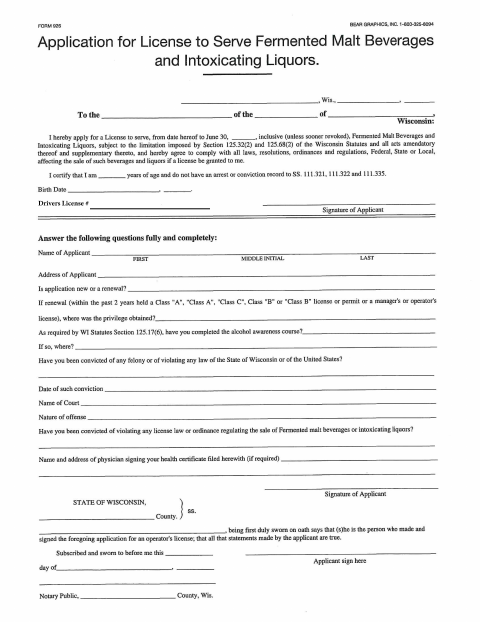
The form requests the applicant’s identifying details, license history, alcohol awareness course information, and answers about certain convictions. The applicant applies to serve fermented malt beverages and intoxicating liquors for the period shown on the form and agrees to follow applicable laws and local rules if granted a license. Submit the completed application to the city or village identified in its address section.
Who needs it
A person applying for a license to serve fermented malt beverages and intoxicating liquors, whether applying for a new license or renewal, needs this form.
How to get this notarized
- 1
Download The Application
Get the License to Serve Application from the city or village.
- 2
Fill In The Form
Provide your personal details, license history, course information, and answers to the application questions.
- 3
Book An Online Notary
Schedule a remote session with a commissioned online notary.
- 4
Sign On Video
Show your identification, take the oath, and sign the application while the notary observes.
- 5
Submit To The City
Send the completed application to the city or village identified in the form.
Preview the form
The blank PDF straight from Greenwood. Look it over, then upload your filled copy to start the notary session.

You’ll need ID and a webcam.
A licensed online notary will join you on video, verify your government-issued ID, witness your signature, and apply their seal. You’ll receive the notarized PDF by email when the session ends.
Frequently asked questions
- How do I complete the notary section?
- Complete the application, then sign and swear to the statements before a commissioned online notary. The notary completes the jurat after witnessing your oath and signature.
- Do I need to sign the application in front of a notary?
- Yes. The form includes an oath stating that the applicant’s statements are true and a subscribed-and-sworn jurat. Sign before the notary, not in advance.
- Can I notarize this form online?
- Wisconsin permits remote online notarization by a commissioned online notary, and the Department of Financial Institutions administers it. Confirm with the city or village if unsure whether it accepts an electronically notarized application.
- What information does the application ask for?
- It asks for applicant and address details, whether the application is new or a renewal, alcohol awareness course information, and responses about convictions and prior licenses.