
Eastman, WI · Crawford County
Renewal Alcohol Beverage License Application
This renewal application is for existing alcohol beverage licensees seeking to renew a license, and it is submitted to the municipal clerk for the municipality where the licensed premises are located.
- licensed online notary
- ~15 min average
- Notarized PDF emailed
What you’ll need
- Government-issued photo ID
- Webcam-enabled device (laptop or phone)
- This form, ready to upload as a PDF
What this form is
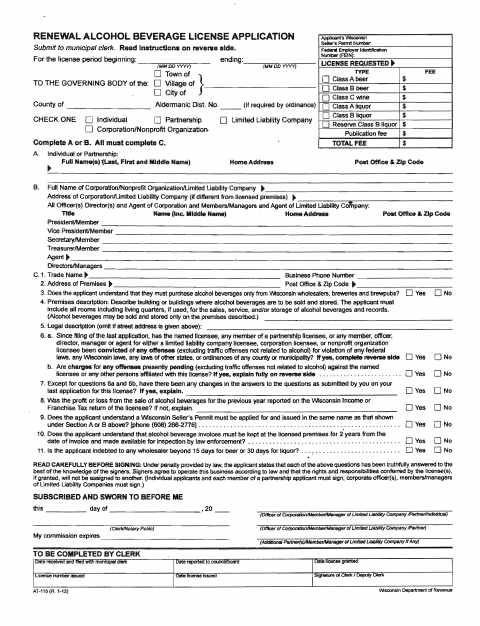
The application collects information about the applicant or business, licensed premises, requested license type, and changes or other disclosures since the last application. The form says it cannot be used when the business entity changes, partners are added or dropped, or the application is for a different municipality. Complete it and return it to the clerk; the instructions also call for any required supporting forms when business details have changed.
Who needs it
An existing individual, partnership, corporation, nonprofit organization, or limited liability company licensee seeking renewal should complete and submit this application to the municipal clerk.
Why it needs a notary
The application carries a “Subscribed and sworn to before me” jurat; the applicant signers identified in the form must sign in the notary’s presence.
How to get this notarized
- 1
Download the Application
Download the renewal alcohol beverage license application and review the instructions on the reverse side.
- 2
Fill In the Application
Complete the applicable applicant, license, premises, and disclosure sections; answer all questions fully and accurately.
- 3
Book an Online Notary
Arrange an online notarization for the signers who must sign the application.
- 4
Sign on Video
Sign where indicated during the online notary session, in the notary’s presence.
- 5
Submit to the Clerk
Return the completed application to the municipal clerk as directed by the form.
Preview the form
The blank PDF straight from Eastman. Look it over, then upload your filled copy to start the notary session.

You’ll need ID and a webcam.
A licensed online notary will join you on video, verify your government-issued ID, witness your signature, and apply their seal. You’ll receive the notarized PDF by email when the session ends.
Frequently asked questions
- How do I complete the notarization for this renewal application?
- Complete the application, then book a commissioned online notary. Signers must sign in the notary’s presence, and the form should be returned to the municipal clerk.
- Do I need to sign the application in front of a notary?
- Yes. The instructions say the application must be signed where indicated on all copies in the presence of a notary public.
- Can I notarize this application online?
- Wisconsin authorizes remote online notarization for its own notaries under Wis. Stat. §140.145. Ask the municipal clerk whether an online notarization is acceptable for this application.
- Where do I submit the completed application?
- The form instructs applicants to complete, sign, and return it to the clerk. Confirm with the city or village if unsure where to submit it.