
Juneau, WI · Dodge County
Renewal Alcohol Beverage License Application
This application lets an existing individual, partnership, corporation, nonprofit, or limited liability company request renewal of an alcohol beverage license by submitting business, premises, and applicant information to the municipal clerk.
- licensed online notary
- ~15 min average
- Notarized PDF emailed
What you’ll need
- Government-issued photo ID
- Webcam-enabled device (laptop or phone)
- This form, ready to upload as a PDF
What this form is
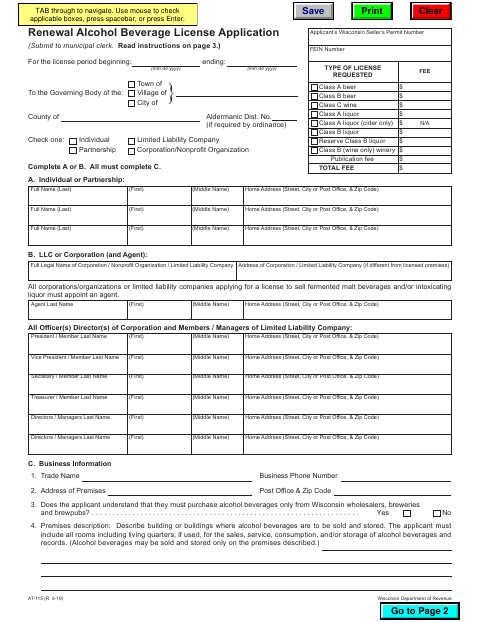
Use this renewal application to request an alcohol beverage license for the next license period. It collects applicant and business details, the licensed premises description, requested license type, and answers about convictions, pending charges, and other changes since the last application. The form says to submit it to the municipal clerk and cannot be used when the business entity changes, partners are added or dropped, or the application is for a different municipality.
Who needs it
An existing licensee applying to renew an alcohol beverage license for the same business entity in the same municipality should complete and submit this form to the municipal clerk.
Why it needs a notary
The provided form text shows an applicant signature line and sworn statement, but no jurat or acknowledgment block; the applicant signs, and should confirm any notarization requirement with the clerk.
How to get this notarized
- 1
Download The Application
Get the Renewal Alcohol Beverage License Application and read the instructions on page 3.
- 2
Complete The Form
Select the applicant type, provide license and premises information, answer each question, and include page 3 details if applicable.
- 3
Check The Signature Requirement
Review the applicant signature section and confirm with the municipal clerk whether notarization is required.
- 4
Book An Online Notary If Required
If the clerk confirms notarization is needed, book a commissioned online notary and follow the signing instructions.
- 5
Sign And Submit
Sign as instructed and return the completed application to the municipal clerk.
Preview the form
The blank PDF straight from Juneau. Look it over, then upload your filled copy to start the notary session.

You’ll need ID and a webcam.
A licensed online notary will join you on video, verify your government-issued ID, witness your signature, and apply their seal. You’ll receive the notarized PDF by email when the session ends.
Frequently asked questions
- How do I submit the completed renewal application?
- The form instructs applicants to complete, sign, and return it to the municipal clerk. It also says to read the instructions on page 3 and answer all questions fully and accurately.
- Do I need to have this application notarized?
- The supplied form text includes an applicant signature line but no visible jurat or acknowledgment block. Confirm with the city or village if unsure whether notarization is required.
- Can I use this form if my business entity or partners changed?
- No. The form says it cannot be used if the business entity changes or partners are added or dropped. It directs applicants to use Form AT-106 for certain changes.
- Can I sign this form with a commissioned online notary?
- Wisconsin authorizes remote online notarization for its own notaries under Wis. Stat. §140.145, but the supplied form text does not show a notarial certificate. Check with the municipal clerk before booking.
Other forms in Juneau
Renewal Alcohol Beverage License Application in other Wisconsin cities
Each city publishes its own version of this form. Pick the city where you’re filing.